
The job today
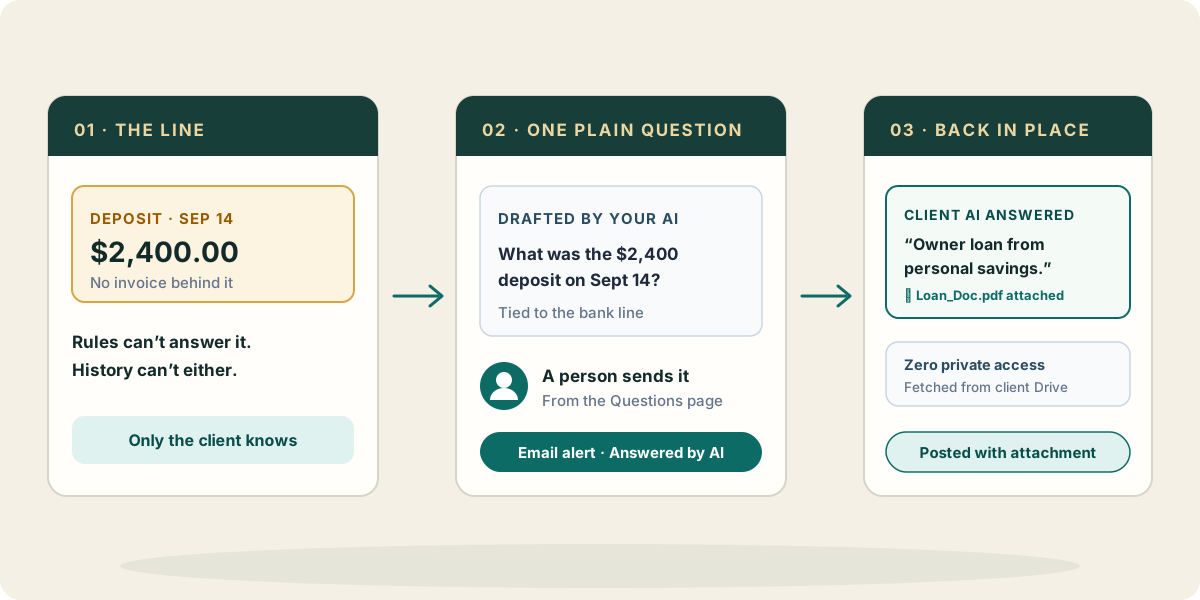
By the twentieth of the month, the books are done except for the lines nobody can code: a $2,400 deposit with no invoice, three Amazon orders that could be supplies or personal, an unexplained transfer.
So begins the receipt chase—the biggest bottleneck and friction in outsourced bookkeeping. You copy dates into an email, translate accounting terms into plain words, and wait. Answers trickle back days later across emails, text messages, and phone calls. Documents land in three different inboxes. You match replies to bank lines by hand, track open items on sticky notes, and when a colleague covers for you, the client gets asked twice.
With Zeno
Your AI starts from the books, not a blank email. It codes what history and rules already explain, and drafts plain questions for the rest—asking only what the books cannot answer.
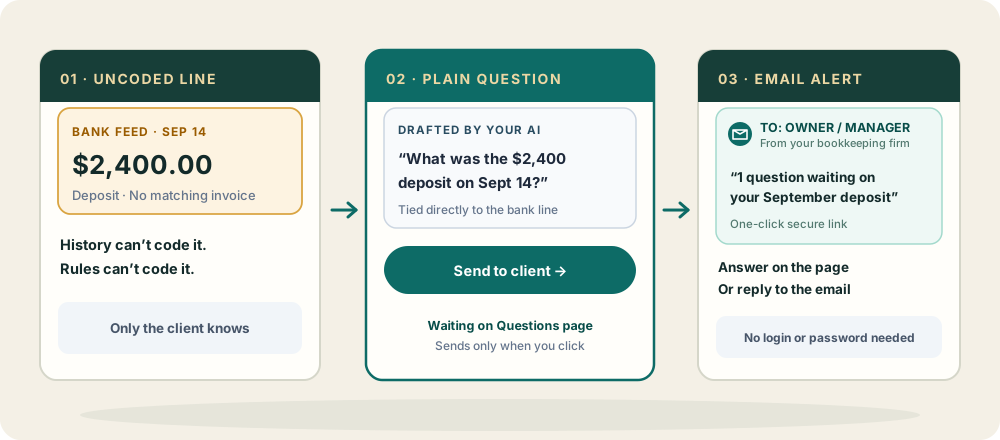
Each question waits on the Questions page tied directly to its transaction. A bookkeeper sends them in one click. The client receives an email notification with a secure link to answer online or can simply reply to the email. Answers and incoming documents route straight back to the client’s file beside the transaction, ready to become a plan you approve.
The bookkeeping zone: view-only access and the closed loop
Zeno is the bookkeeping zone: the shared, secure ground between the firm and the business. Everyone has AI now; Zeno provides the privacy boundaries and structure that make it work.
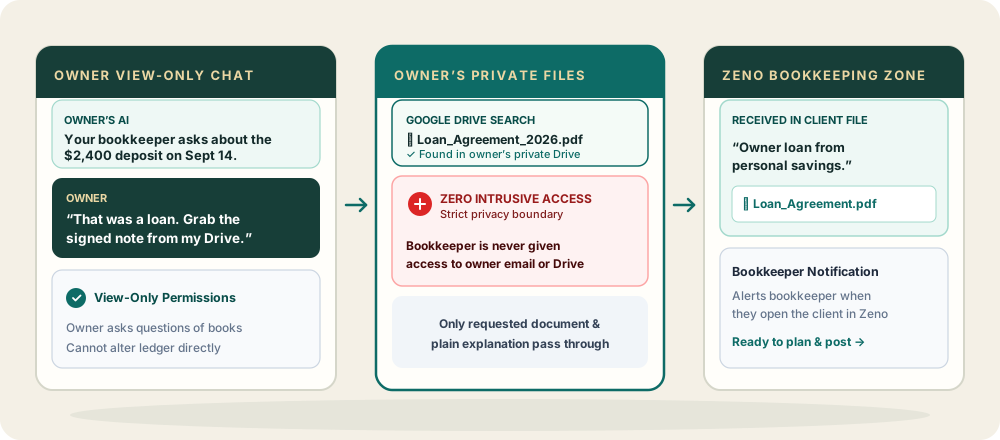
Business owners and managers get view-only access in Zeno. They can connect their own AI to inspect reports, ask questions of their books directly, or leave questions for their bookkeeper from the same chat.
When the bookkeeper has a question, Zeno closes the loop without any invasive access:
- Tied to the line. An unexplained transaction gets an AI-drafted question and an email alert to the owner.
- View-only chat. In view-only mode, the owner’s AI sees open items waiting on those lines and flags them next time the owner chats.
- Private retrieval. The owner tells their AI to find the receipt or invoice. Their AI searches their private Gmail, Google Drive, OneDrive, or local computer and returns the document and explanation to Zeno.
- Zero intrusive access. Your firm never needs access to the owner’s personal inbox or cloud drives. The client’s AI works strictly within their own private accounts, returning only the specific document needed.
- The closed loop. The bookkeeper is notified when opening the client in Zeno. Your AI prepares the plan, you approve it, and the transaction is recorded in QuickBooks Online with the supporting document attached to the ledger record.
Recorded in QuickBooks Online with the attachment
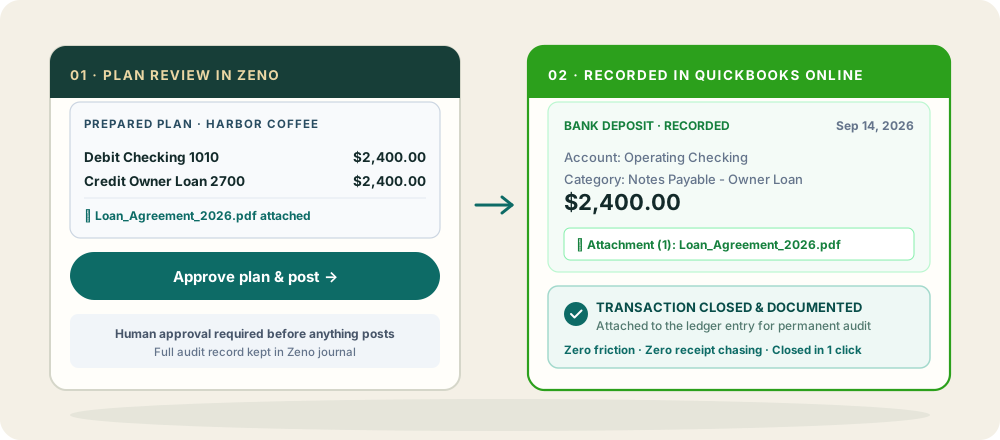
An answer is words, never an automatic entry: nothing posts because a client wrote back. When the document and explanation arrive, your AI prepares the plan coding the transaction and attaching the file.
You review the plan, approve it, and Zeno posts it to QuickBooks Online in one run. The receipt or contract is permanently attached to the ledger entry, creating an audit trail with no paperwork chase.
What your AI brings from elsewhere
When your AI has connectors to your firm’s email or shared drive, it can search prior threads or contracts before drafting a question you already asked last year. A calendar connection shows when you next meet the owner, so complex items can wait for the call.
These capabilities belong to your AI and the connectors you choose. Zeno stays focused on the ledger, bank lines, and the bookkeeping zone.
Where it stops
Zeno never sends an email without human review and never treats a client’s reply as an unreviewed instruction. A reply asking to change payment details or vendors is surfaced directly to you. Answers only become ledger entries through a plan you approve.