
The job today
Monday starts with the A/R aging. You export it, because the screen version does not let you make notes, and you sort it by the 90+ column. Then the real work starts: finding out which of these balances are real.
Half of the old ones are not. A customer paid by check, someone recorded the payment, and it never got applied to the invoice, so QuickBooks shows a credit on the customer and an open invoice at the same time. Another payment went to Undeposited Funds and sits there because the deposit was entered from the bank feed as new income instead. One customer short-paid an invoice by the card fee, and the $11.40 has been aging for eight months.
You can only find these by opening each customer, scrolling their transactions, and comparing dates against the deposit detail. For a client with forty customers that is most of a morning. Then come the reminders: copying invoice numbers and amounts into an email, softening the tone for the customer who always pays eventually, attaching the invoice PDF, and keeping a note somewhere of who was chased when. By the time the owner asks “who owes us money?”, the answer you give is already a few days old.
What goes wrong is quiet. A reminder goes to a customer who paid three weeks ago. The owner quotes last month’s aging to the bank. A credit sits on a customer for a year because nobody looked at that side of the ledger.
With Zeno
The aging comes from QuickBooks Online itself, read live when you ask, never added up from an older copy. What Zeno quotes is what the client would see if they ran the report themselves.
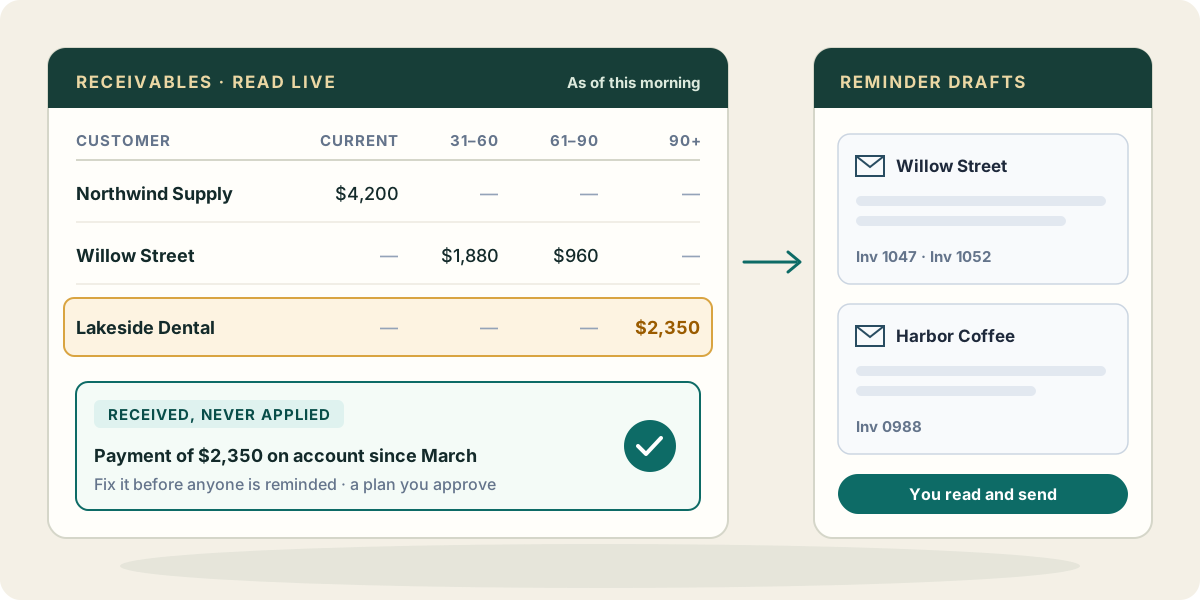
Before anyone writes a reminder, the receivables checks look for the balances that are not what they seem. Zeno’s built-in checks list invoices open past 90 days with what is behind them, customers and vendors holding money on account, payments and credits that were received or issued but never applied to what they settled, and Undeposited Funds that never reached a deposit. Each finding comes with the transactions behind it, so you are looking at the answer, not a lead.
When a check finds a payment that should have been applied, the fix is yours to decide. Zeno prepares it as a plan you read, trim and approve with your own click, or, for a single document, as one correction you ask for by name. Either way it is recorded with who asked. On the bank feed, incoming lines are compared with the register first, so a customer payment already in QuickBooks gets linked to rather than entered a second time as new income. That is where many of the phantom open invoices come from in the first place.
Sending an invoice is the one step here that goes out the door. Zeno does it only when you ask, through QuickBooks Online, after you confirm, because an email cannot be recalled. Every send is written into the work history. Zeno itself sends no collection reminders and runs no dunning schedule.
What your AI brings from elsewhere
The reminders are where your AI’s other connections earn their keep. If your Claude, ChatGPT or Muse is connected to your Gmail or Outlook, it can draft each note in your mailbox, with the invoice numbers and amounts from the live aging, ready for you to read and send. Zeno does not touch your mail; your AI does, through its own connector, and only drafts what you asked for.
It can also read the history that never made it into QuickBooks: the email thread where the customer said the check was in the mail, the note in your CRM that the account manager agreed to split the payment, the signed payment plan in a Drive folder. It can check your calendar for the follow-up call you promised. Put together, a reminder that says “you mentioned on the 3rd that this was being processed” lands better than a template.
Where it stops
Zeno does not move money, take card payments or contact customers on its own. Writing off a balance, deciding a dispute and agreeing a payment plan are your calls, and a write-off that changes the books is a plan you approve. The aging is only as current as the deposits behind it: if the bank activity for last week is not in yet, say so when you quote the number.