
The job today
The trucks go out at seven. By eight the card statement has forty new charges on it, and most of them say “HOME DEPOT #4471” and nothing else. Somewhere in the truck there is a receipt with “Willow St” written on it in marker, or there isn’t. The supplier invoices arrive by email as PDFs with a job name in the reference field, sometimes the right one. The subs bill whenever they remember to, and one of them bills two jobs on one invoice.
So the job-cost work happens in batches, usually at month-end, usually by the one person in the office who knows which super was on which site that week. They open the card feed in one tab, the receipts folder in another, the project list in a third, and they go line by line: this is Maple, this is Oak Street, this one is a guess. The estimate lives in a spreadsheet on the shared drive. The change orders live in somebody’s email.
What goes wrong is quiet. A $3,800 window order lands on general job supplies instead of the job it was for, and that job looks profitable until the final invoice is already out. A class gets left off half the lines, so the by-division report is wrong for the whole quarter and nobody notices until the owner asks why framing made money and finishing didn’t. The report the owner wants, how is this job doing right now, is always a month late.
With Zeno
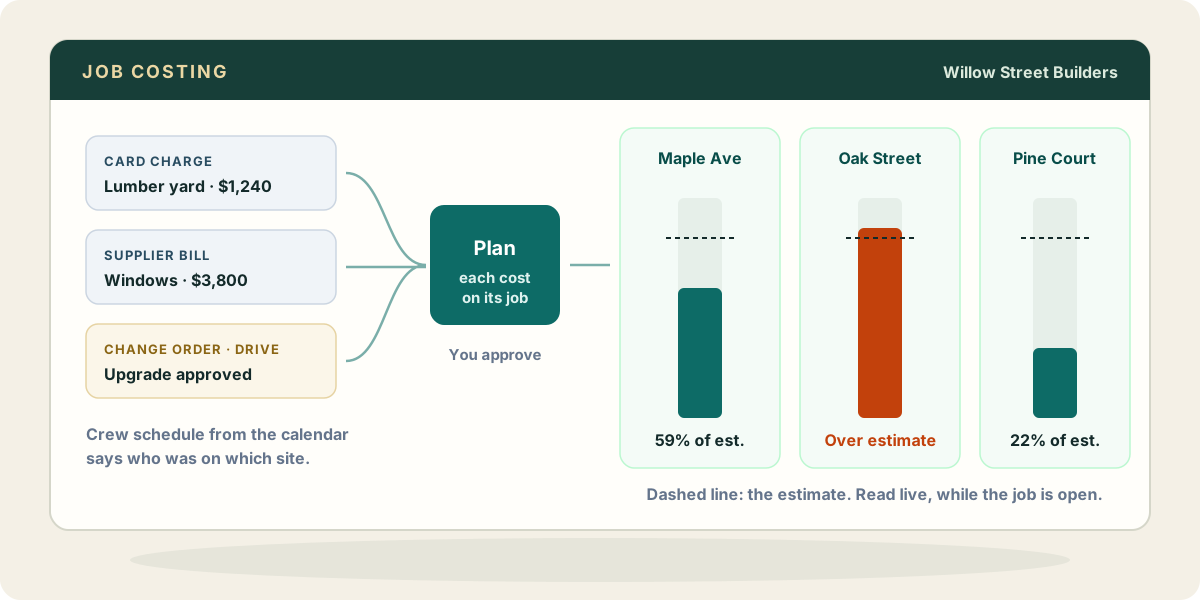
Your AI does the line-by-line work through Zeno, and you do the deciding.
Bank and card activity comes into Zeno from the bank connection or a statement file. Bills and receipts forwarded to the client’s documents address are read and matched to the vendor list. When you ask for the week’s coding, the AI puts each cost on its project as part of the plan: on the line of a bill, a check, a card charge, a vendor credit, a purchase order or a journal entry, and on the form itself for an invoice or estimate. Zeno reads the company’s projects live from QuickBooks and resolves every name against them before the plan is drawn, so a misspelled job is a question, not a new project.
Some places don’t take a project directly, and Zeno knows which. QuickBooks Online quietly drops a project put on a deposit line; Zeno refuses that line and tells the AI to name the project as the line’s customer instead, which is how QuickBooks lists each project, under its client. You see a plan that will post the way it reads.
Projects themselves change through plans too. Creating the Maple Avenue project, moving its due date, marking it complete: each is a line in a plan you approve, and Zeno refuses a plan that would leave two projects with the same name.
Classes and locations ride on the same lines. The built-in check for expenses of $1,000 or more with no class runs over the books on request and shows you the gaps, so the by-division report stops being a quarterly surprise. Fixes for what it finds come back as one plan, and one reversible run.
Projects, classes and locations need QuickBooks Online Plus or Advanced, with Projects turned on in the company settings. A company connected before Zeno asked for the Projects permission is told to reconnect from the Clients page.
What your AI brings from elsewhere
The parts of job costing that never lived in QuickBooks are the parts your AI can reach on its own, through the connectors you have given it.
- The calendar. If the crew schedule is in Google Calendar or Outlook, your AI can see which crew was on Oak Street the week of the 14th. A Home Depot charge on the 16th from that super’s card is then not a guess.
- Drive or OneDrive. The estimate spreadsheet and the signed change orders. Asking how a job runs against its estimate works best when your AI can open the estimate itself, and a change order in the job folder tells it the window upgrade was approved and billable.
- Mail. The supplier’s email that says “split this order across Maple and Oak, 60/40” is evidence your AI can quote when it proposes the split.
Zeno doesn’t connect to any of these. Your AI does, through Claude, ChatGPT or Muse. What it learns there is evidence for the plan; the plan still waits for you.
Where it stops
Zeno doesn’t decide how overhead is allocated across jobs, and it doesn’t run payroll, so labour costs arrive however your payroll provider posts them. It doesn’t close a project on its own judgment: marking one complete is a plan line you approve.