
There is nothing to migrate. Connect one client and put one month through.
Zeno connects on top of each client’s QuickBooks Online company. The ledger, the chart of accounts and the history stay where they are. What changes is who prepares the work and how it gets checked. Here is what the first month looks like, with something to ask at each step.
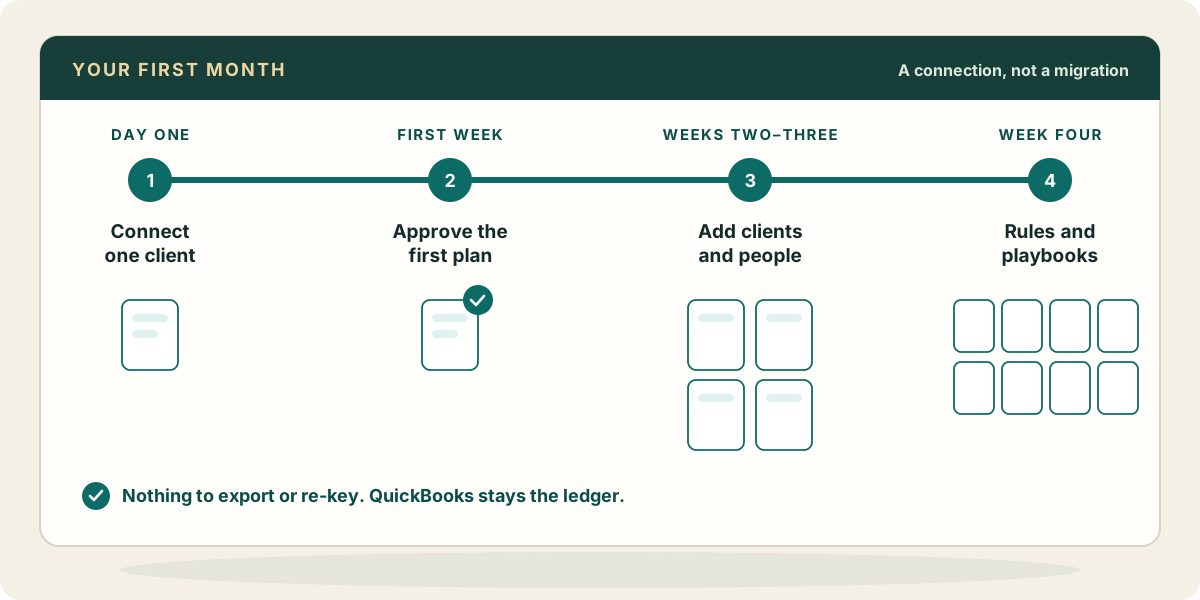
- Day one
Connect one client and your AI
Start the trial, connect one client company with a QuickBooks sign-in that has access to it, and connect Claude, ChatGPT or Muse to Zeno. Zeno reads the company’s lists and history while you do the rest.
Try“What is left to set up for this client?”
- Day one or two
Look before you change anything
Run the check-up and let Zeno study the history. You get what is plainly wrong in the books, and drafts of how this client has been coded. Answer the handful of setup questions only you can answer, and confirm the drafts that are right.
Try“Run the check-up and tell me what I’m walking into. Don’t change anything.”
- First week
Bring in one account
Connect the client’s main bank or card account to Zeno, or import last month’s statement. Turn off QuickBooks’ own feed for that account so nothing arrives twice. Give the client their documents address for bills and receipts.
Try“Code last month on the operating account and tell me what you couldn’t decide.”
- First week
Approve your first plan
Read the plan, trim anything you disagree with, and approve it. It posts as one run. Look at the run afterwards, and reverse it if you want to see how undoing works while the stakes are one month on one account.
Try“Show me what posted in that run, and anything you noted.”
- Weeks two and three
Add clients and people
Connect the next clients at whatever pace suits you; the rest carry on as they are. Invite the team, limit people to their clients where that makes sense, and decide who may approve postings.
Try“What recurring work is due across our clients this week?”
- Week four
Write down the month
Turn the corrections from the first month into rules you confirm, and the steps you repeat into a playbook, so the second month starts from the first. Give owners who want to look a view-only seat.
Try“We coded Comcast the same way twice now. Draft a rule for it.”
The parts of a software switch that don’t apply.
Stopping is just as quiet. Disconnect a client and Zeno stops reading; QuickBooks is exactly as you left it, with everything that posted through Zeno already in it.
- Export anything out of QuickBooks
- Re-key, re-code or re-import history
- Change a client’s chart of accounts, classes or lists
- Teach Zeno from a spreadsheet of past coding: it reads the history itself
- Run a second ledger in parallel: QuickBooks stays the books
- Move every client at once
Questions partners ask before the first client
Will Zeno change anything in the history?
Not unless you approve a plan that does. Reading, checking and studying the history change nothing in QuickBooks.
Each client has a different chart of accounts.
That is expected. Each client keeps its own chart, lists, rules and knowledge. Nothing one client taught Zeno is used on another.
What if QuickBooks is down or slow?
Zeno waits and tries again, and a posting that is retried is never entered twice.
Some of our clients are on QuickBooks Desktop.
Those run on Zeno installed on Windows, beside the company file, with the same habits: plan, approve, post, record.
More things to ask → · Everything else people ask → · The setup guide in the docs →