
Bank and card activity
Checks, card charges and credits, deposits and transfers, coded from a bank connection or a statement file and matched against what is already in the books.
Zeno is the same product, at the same price, on every QuickBooks Online plan. What changes is what the company’s own plan turns on: Zeno can only prepare what QuickBooks will accept. Here is what opens up at each step.
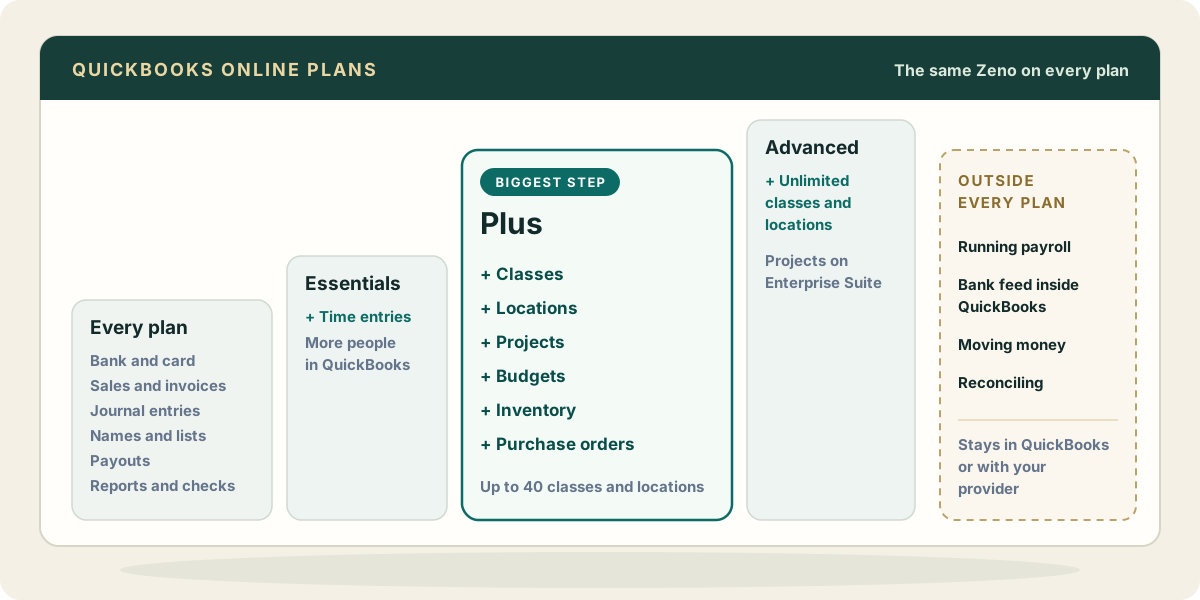
The everyday work runs on any QuickBooks Online plan.
Checks, card charges and credits, deposits and transfers, coded from a bank connection or a statement file and matched against what is already in the books.
Invoices, estimates, sales receipts, payments received, credit memos and refunds, with sending an invoice when you ask.
Adjustments, accruals and corrections, with the reason written on the plan.
Customers, vendors, accounts, products and services, terms and payment methods, created and changed only through a plan.
Stripe, Square and Helcim deposits split into sales, refunds and fees.
Receipts attached to their charges, and bulk voids, deletions and corrections as one reversible run.
Profit and loss, balance sheet, agings and the rest read live, and the nineteen built-in checks.
Every one of these is prepared as a plan and posts only after a person approves it.
Bills and payables, more people in QuickBooks, and time on invoices.
Bills, vendor credits and bill payments, read from the documents that arrive and prepared with the document attached. Paying them stays in QuickBooks or your bank.
Hours worked by an employee or contractor, billable or not, prepared from a timesheet your AI reads and approved before they post.
Zeno never counts people, so the extra QuickBooks seats change nothing on the Zeno side.
Most of what firms call “above the basics” starts here.
Lines tagged by class and location in every plan, list changes through a plan, and a check for large expenses that carry no class.
Projects created, renamed, dated and closed through a plan, and costs and sales tagged to the right one.
Budgets written to QuickBooks through a plan, and budget against actual compared live, line by line.
Stock counts turned into inventory adjustments, with a warning when an item would go below zero. US companies only.
Orders to vendors prepared and approved like any other document.
On Plus, QuickBooks allows up to 40 classes and locations combined.
Larger teams and more structure in QuickBooks.
The 40 limit goes away, and Zeno tags against whatever list the company keeps.
Projects work the same way on Intuit Enterprise Suite companies.
Batch entry and approval workflows inside QuickBooks are Advanced features of their own. Zeno’s plans are its own batches, on every plan.
These stay in QuickBooks, or with the provider that runs them, whichever plan the company is on.
Payroll runs in QuickBooks Payroll or your payroll provider. Your AI can read the provider’s reports through its own connections, and Zeno can post the payroll journal entry from them through a plan.
No outside app can read the For Review tab. Zeno brings bank activity in itself.
Bill pay and payments stay in QuickBooks or your bank. Zeno never moves money.
Finished in QuickBooks. Zeno shows what is missing or doubled against the statement.
Plans and their features are Intuit’s and change from time to time; check the company’s plan in QuickBooks under Settings > Subscriptions and billing. Every change Zeno prepares, on any plan, waits for a person’s approval. What Zeno will not do →