
The job today
The close starts with a checklist, usually a spreadsheet with a row per client and a column per step: bank coded, cards coded, payouts booked, Undeposited Funds cleared, receivables reviewed, reconciliations done, reports sent. The checklist says what should happen. It does not say how each person on the team does it, and they do not all do it the same way.
For each client you open QuickBooks Online and go looking. Is anything still in Uncategorized or Ask My Accountant? Does the Stripe or Square clearing account net to zero, or has it been drifting since spring? Is there a payment sitting in Undeposited Funds from six weeks ago? Are there two vendors that are clearly the same company? None of this is hard. It is just the same twenty minutes of clicking, twenty times, and the client you check last on the tenth gets the most tired version of you.
Then there are the fixes, done one transaction at a time, and the questions for the client, typed into emails. At the end, the only record of what was checked is a tick in a spreadsheet cell. When the reviewer asks why the clearing account was off in August, or the client asks in March what happened in September, the answer is in somebody’s memory, if anywhere.
With Zeno
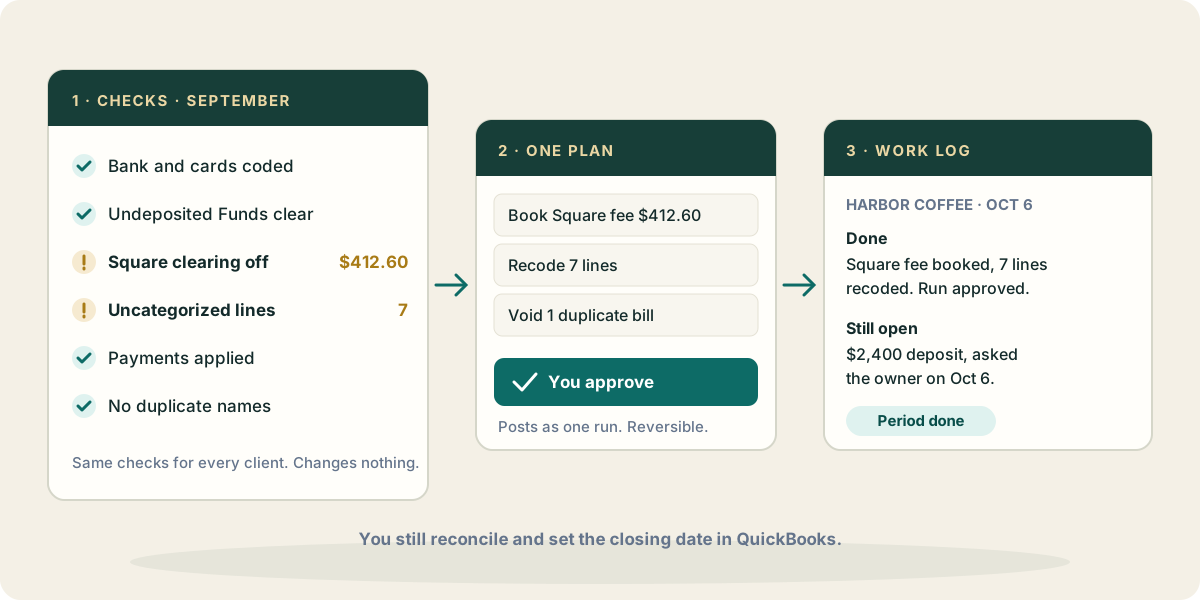
The part that does not need judgment runs the same way for every client. Zeno’s built-in checks read each client’s books the same way every time: holding accounts that should wash to zero and have not, Undeposited Funds carrying a balance, payments and credits never applied, merchant clearing accounts out of balance, invoices open past 90 days, lines still sitting in Uncategorized or Ask My Accountant, names that look like the same counterparty twice. Each finding comes with the transactions behind it. Running them changes nothing in QuickBooks.
The part the firm has already decided is written down once. A playbook holds your close steps in your own words, for the firm or for one client. Whoever does the close, and whichever AI they use, starts from the same steps.
Fixes come back as plans. Your AI groups the reclassifications, the duplicate bills to void and the names to retire into one plan for the client, with every line shown before and after. You approve it with your own click and it posts as one run. If it turns out wrong, the run can be reversed as a whole. Questions only the client can answer are drafted for you to send from the console, and their answers come back to the client’s file.
And the record keeps itself. After every action the AI writes to the work log: what was done, why, and what is still open. Next month, the question “what did we leave open on Harbor Coffee?” has an answer that someone wrote down at the time.
What your AI brings from elsewhere
Some close inputs never reach the books on their own, and your AI can fetch them through its own connections, not through Zeno.
- Statements and payroll reports in Drive or OneDrive. The loan statement that gives the principal and interest split, the payroll provider’s register that shows what the journal entry should be. Your AI reads them and prepares the entry as a plan.
- Mail. The client’s answer to last month’s question, a vendor statement showing a bill you never received, the bank’s notice of a fee change.
- The calendar. Which clients close on the fifth business day and which on the fifteenth, and the review meeting the package has to be ready for.
Where it stops
Zeno cannot mark QuickBooks Online transactions as cleared or finish a reconciliation: it can show you what is missing or doubled against the statement, and you reconcile in QuickBooks. Marking a period done in Zeno does not set the books’ closing date in QuickBooks; set that there when you are ready to lock the month. The checks find what is plainly wrong. They do not decide whether an accrual is missing or revenue landed in the right month. That is still the close.