
The job today
Budget season usually starts with an export. Last year’s profit and loss by month goes into a spreadsheet, and the spreadsheet gets a new tab called “2027 draft”. From there the work is mostly hunting.
The hiring plan is a document the owner wrote in August and shared once. The new lease is a PDF in a folder somebody else set up. The insurance renewal is a date in the office manager’s calendar. The supplier’s price increase came in an email in the spring that nobody forwarded to you. Each of these is a line in next year’s budget, and each one lives somewhere other than the books.
So you copy last year forward, adjust what you remember, and email the owner a list of questions. Two weeks later you have half the answers and a budget that is mostly last year plus 3%. Then someone has to type it into QuickBooks Online, account by account and month by month, or import it and fix the account names that did not match.
Then the year starts and the second half of the job begins: every month, budget against actuals, and an explanation for every line that moved. Half the variances turn out to be timing, a renewal billed in June instead of March, and you knew that in October. It just never got from the calendar into the budget.
With Zeno
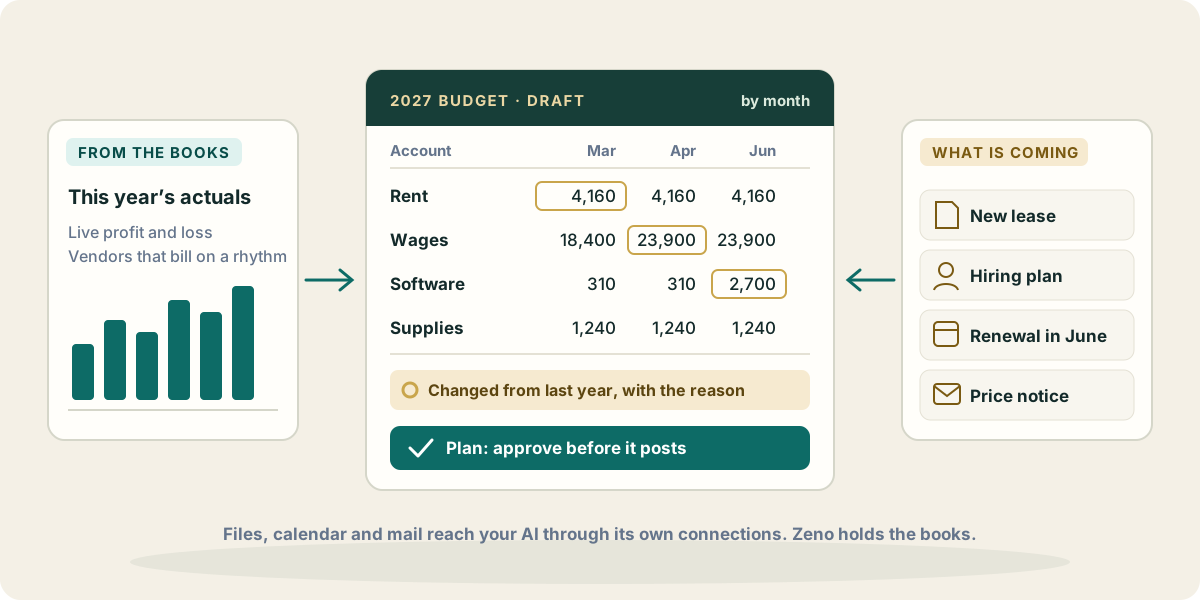
Zeno reads the client’s books, so your AI starts from the real numbers instead of an export: this year’s actuals by account and month, and the history behind them. Zeno’s history study already knows which vendors bill on a rhythm and at what size, which accounts have gone quiet, and how each vendor is usually coded. That is most of a straight-line budget, drafted before you open a spreadsheet.
You ask for a draft and say what to take into account. Your AI prepares it in the conversation, with every departure from last year written down beside the line it changed. You argue with it in plain words: “keep marketing flat,” “the second hire is only likely, leave her out,” “spread the equipment purchase over the year.” It revises.
When the draft is right, the budget goes into QuickBooks Online through a plan. The plan shows each account and month with its amount, and for a change to an existing budget, each amount before and after. Zeno reads the client’s current budgets from QuickBooks at the moment of planning, so a change is checked against the budget as it stands now, not a stale copy. Nothing is written until you approve the plan with your own click. Then it posts as one run, recorded and reversible.
During the year, budget against actuals is a question rather than a report you rebuild. Zeno takes the actuals live from the same profit and loss the client reads, compares them with the budget for the dates you name, and your AI explains the lines that carry the difference. When something changes mid-year, a rent increase or a lost contract, the update is another plan that touches only the lines that change.
What your AI brings from elsewhere
This is where budgeting gets better, and it does not come from Zeno. Claude, ChatGPT and Muse can each connect to other places a client’s future is already written down, and your AI can read those in the same conversation in which it reads the books through Zeno.
- Files in Google Drive or OneDrive. The new lease with its rent steps. The owner’s hiring plan with start dates and salaries. A loan agreement with its payment schedule. Your AI reads them and turns each into budget lines, and says which document each line came from.
- The calendar. Insurance and software renewals, a trade show in May, the quarterly estimated tax dates. A renewal on the calendar is a budget line in the right month, not the month it happened to land in last year.
- Mail. The supplier’s price increase notice, a quote for the new equipment, the landlord’s letter. Your AI can find them and put the number where it belongs.
- A spreadsheet the owner keeps. A sales pipeline or a list of signed contracts is a better revenue forecast than last year plus a percentage.
What reaches your AI from those places depends on what you have connected to it and what you allow it to read. Zeno sees none of it. What Zeno sees is the budget your AI proposes, as a plan, and it checks that plan against the client’s real accounts before you approve it.
Where it stops
Budgets in QuickBooks Online need the Plus or Advanced plan. On Simple Start and Essentials your AI can still draft a budget and compare it with live actuals in the conversation, but there is no QuickBooks budget to write it into. Zeno does not forecast cash or decide which assumptions are reasonable: the draft is your AI’s work and your judgment, and the numbers it starts from are the client’s own.