
The job today
In January the emails start: “Can you send the year-end package?” Each preparer wants something slightly different, but the list rhymes. A trial balance. A profit and loss and a balance sheet as of December 31. A list of fixed assets bought during the year. Loan balances that tie to the lender’s statements. Owner draws and contributions. Vendors who need a 1099, with their addresses and tax ids.
So you open each client, run the reports, export them, and start reading. The balance sheet shows Undeposited Funds holding $3,180 that nobody can explain. Ask My Accountant has eleven lines from August. The new truck was booked to Repairs. The loan balance does not match the bank’s year-end statement because two payments were coded entirely to interest. You fix what you can, re-run the reports, export them again, and rename the files so you know which version is final.
The 1099 list is its own afternoon. You run the vendor report, compare it with the vendors marked for 1099, find the plumber paid $7,400 who was never marked and the consultant marked who was paid by card. You chase W-9s by email.
Then the package goes out, and in March the preparer writes back. “Why did office expense double?” “What is this $12,000 journal entry in June?” The answer was clear when you made the entry. Now it is in your head, if anywhere, and you dig through emails to reconstruct it.
The hours go to finding problems late, re-running reports after each fix, and explaining decisions nobody wrote down.
With Zeno
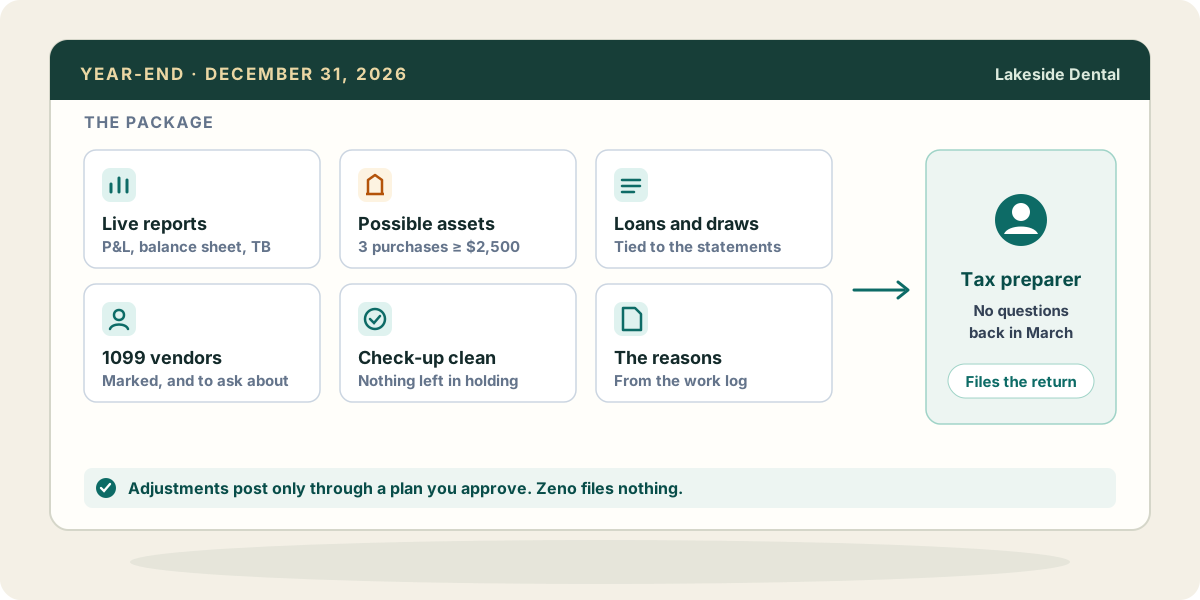
The reports come from QuickBooks live: trial balance, profit and loss, balance sheet, general ledger, aged payables and receivables, on cash or accrual basis, for the dates you name. They are the same figures the preparer would see if they logged in, read at the moment you ask, never added up from an older copy. Ask your AI to read them through Zeno and say what looks wrong before you send anything.
Run the check-up before you pull the final reports, not after. The checks that matter most at year-end are already in it: balances on the wrong side of their account type, Undeposited Funds carrying a balance, payments and credits never applied, lines still in Uncategorized or Ask My Accountant, bills the books still show as owed, and purchases of $2,500 or more expensed outright that may be assets. Each finding comes with the transactions behind it, so the conversation with the preparer about the truck starts from the document, not from your memory.
Corrections and year-end adjustments come back as plans. Reclassify the truck to a fixed asset account, split the loan payments between principal and interest, book the accrual the preparer asked for: each is prepared by your AI, checked against the client’s accounts and names, and posted only when you approve it with your own click. If an adjustment turns out wrong, the run can be reversed.
For 1099s, the check-up includes a 1099 check: vendors paid by check, cash or bank transfer at least that year’s threshold ($600 through 2025, $2,000 for 2026, indexed for inflation after that) who are not marked for 1099 in QuickBooks. Card payments are left out, because the card processor reports them. Whether each vendor needs a form depends on what was paid for and how the vendor is organised, so it is a list to review with the preparer. Marking a vendor is a name change and goes through a plan. Zeno does not take tax ids: they are entered on the vendor in QuickBooks itself, and Zeno’s tools refuse them.
The part that saves March is the work log. Every action through Zeno was logged as it happened, with what was done, why, and what was left open. When the preparer asks about the June entry, the reason is already written down, and your AI can draft the explanation from it.
What your AI brings from elsewhere
Much of what the preparer needs sits outside the books. If your AI is connected to your Google Drive or OneDrive, it can read the lender’s year-end statement and compare the principal balance with the loan account on the balance sheet, or find the purchase agreement for the truck so the asset is booked at the right cost. If it reaches your mail, it can find the W-9s vendors sent back and tell you which 1099 vendors are still missing one, and it can find the preparer’s own request list so the package answers their questions rather than a generic list.
A payroll provider’s year-end reports, a spreadsheet of the owner’s personal expenses paid by the business, a closing statement for property bought during the year: your AI can read each from wherever it is connected and prepare the entries, which Zeno checks against the books and holds for your approval. These come through your own AI and its connections, not through Zeno.
Where it stops
Zeno does not file anything. 1099s are filed from QuickBooks or by the preparer, and tax returns by the preparer. It does not hold tax ids or Social Security numbers. When you tell Zeno a year is done, it records that in Zeno; it does not set the books’ closing date in QuickBooks, so set that there once the preparer has what they need. And whether something is an asset, and how it is depreciated, is a judgment the checks can point you toward but never make.