
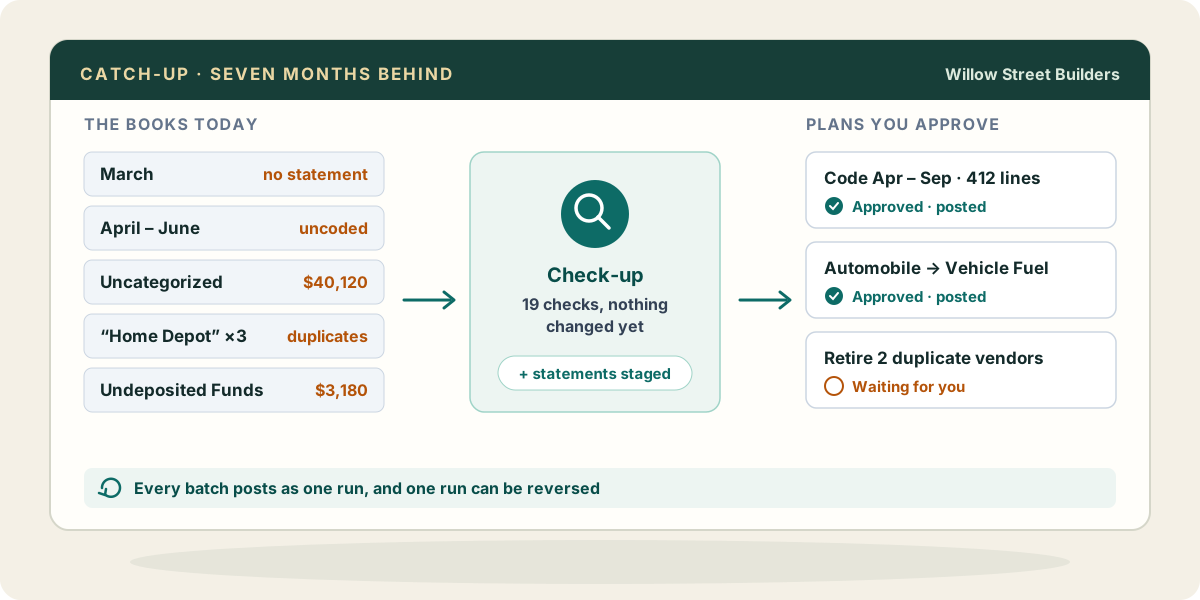
The job today
The file arrives with a sentence like “they kind of stopped after March.” You open it and find out what that means. The bank account has two hundred lines sitting in For Review. Uncategorized Expense holds forty thousand dollars. There are three vendors called some version of “Home Depot,” and the one with the most history is the one with the typo. Undeposited Funds carries a balance from a deposit that was entered twice, once from the sales receipt and once from the bank.
So you start a spreadsheet. One tab per bank account, one row per month, a column for “statement received” and a column for “coded.” You email the owner for statements, get four of the seven, and download the rest yourself after a phone call about the bank password. You export the transaction list to Excel to see what is coded where, sort it, find the Automobile lines that should have been fuel, and then go back into QuickBooks to change them one document at a time. Every one of those edits is a click path: open, change the account, save, close, next.
What goes wrong is quiet. You fix the fuel lines and miss the ones on credit card charges because your export filtered to checks. You merge two vendors and discover afterwards that the merge cannot be undone. You import a statement for an account the client had already partly entered by hand, and now June is doubled. Nobody notices until the reconciliation is off by exactly the amount of the overlap, and you spend an afternoon finding which twelve lines came in twice.
Most of the hours go to finding out what state the books are in, and to making the same correction over and over by hand.
With Zeno
Connect the client’s QuickBooks Online company and Zeno reads the lists and the history. Before anything changes, ask for the check-up: nineteen checks that read the books the same way every time and show the transactions behind what they find. Balances on the wrong side of their account type, Undeposited Funds carrying a balance, payments and credits never applied, lines still in Uncategorized or Ask My Accountant, purchases large enough that they may be assets, names that look like the same party twice. You walk into the cleanup knowing where the problems are instead of discovering them in order.
Then ask Zeno to study the history. It drafts how each vendor has usually been coded, which ones are coded more than one way, which accounts went quiet and when the month usually got closed. Those are drafts: you confirm the ones that reflect what the client actually does, and they guide everything that follows. A vendor coded three ways over two years stops being a guess about which was the decision.
The missing months come from the bank. Connect the account through Plaid and choose how far back to start; a bank shares up to two years of history, and how far back is decided when you connect, so pick the earliest month you need then. For anything older, or a bank Plaid cannot reach, import the statement file (CSV, OFX, QFX or .qbo). Each import is previewed first so you can check the columns and the signs, and staged lines are deduplicated, so a month that overlaps what is already there does not come in twice. Lines already in the QuickBooks register are matched instead of entered again, transfers between two fed accounts are paired, and confirmed rules code the familiar vendors.
The corrections come back as plans. “Move every Automobile line since January to Vehicle Fuel” becomes one cleanup plan covering every affected document, checks and card charges alike, each line shown before and after. Duplicate names become a plan to retire the duplicate in favour of the name you keep. You approve each plan with your own click, it posts as one run, and if the run turns out wrong it can be reversed as a run of its own. Zeno tells you anything it could not fully put back, such as a deleted document that returns under a new number.
Every action is written into the work log with what was done, why, and what is still open. A catch-up that takes three weeks stops depending on one person remembering where they left off.
What your AI brings from elsewhere
The client’s paper rarely arrives in one place. If your AI is connected to your Google Drive or OneDrive, it can read the folder where the owner dumped seven months of statements and tell you which months and accounts are still missing before you ask the client a second time. If it reaches your mail, it can find the bank’s statement emails or the old bookkeeper’s handover note and pull out what matters: the account that was closed in May, the loan nobody entered.
A spreadsheet the client kept on the side, of jobs or cash sales or what they paid the cleaner, can be read by your AI and turned into entries Zeno checks against the books and puts in a plan. These come through your own AI and the connections you gave it, not through Zeno; Zeno’s part is to check what the AI prepares against the client’s books and rules, and hold it for your approval.
Where it stops
Zeno cannot read the transactions waiting in QuickBooks Online’s For Review tab, so an account you rebuild through Zeno should have its QuickBooks bank feed turned off, or lines will arrive twice. Reconciliations are still finished in QuickBooks: Zeno can show you what is missing or doubled against a statement, but it cannot mark transactions cleared. Bank history further back than the bank shared at connect has to come from statement files. And Zeno never decides that a balance the owner cannot explain is simply wrong; that conversation is yours.