
The For Review tab
Intuit lets no outside app read the bank feed waiting inside QuickBooks Online. Zeno brings bank activity in itself, through a bank connection or a statement file.
Deciding whether to let an AI work on a client’s books is mostly a question about what cannot happen. These are the things Zeno refuses. They are built into the tools, so they hold whichever assistant is connected and however the request is worded.
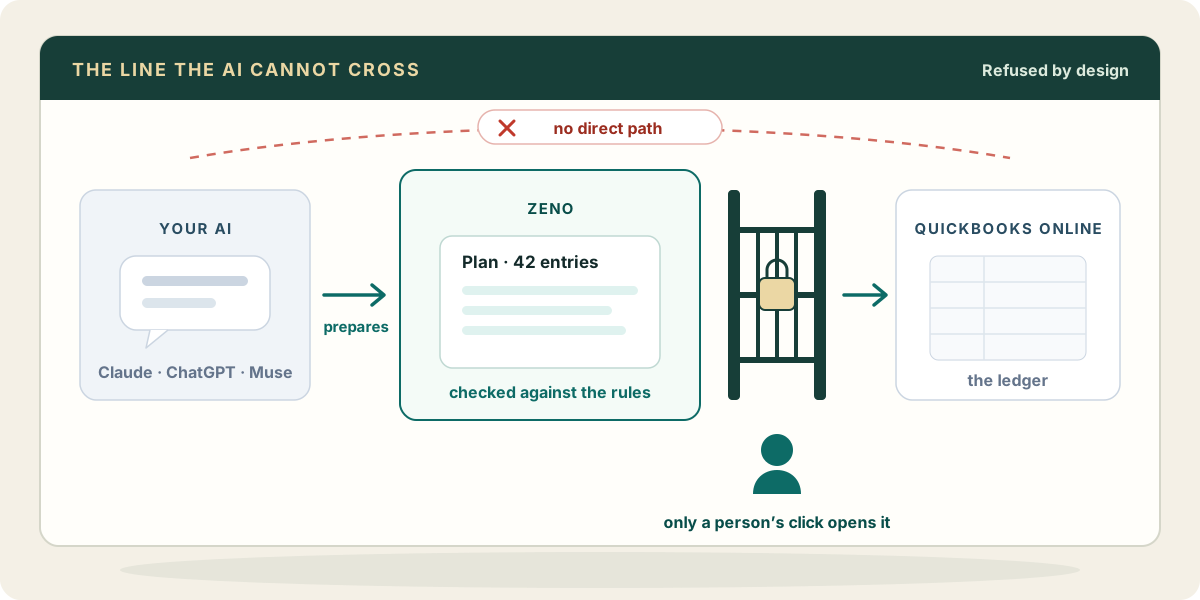
Every new entry becomes a plan. Only someone at the firm approves it, on the plan’s page in the console or drawn in the chat. A “go ahead” typed into the conversation is not an approval, and the AI has no tool that records one.
An approval covers the exact plan you read. If anything in it changes, or the books moved underneath it, Zeno refuses to apply it until a person looks again.
Your assistant connects to Zeno and nothing else. Zeno holds the QuickBooks connection, and Intuit’s credentials are never handed to the AI.
Vendors, customers, accounts, items, classes and the other lists change only through a plan. There is no tool for an AI to rename a vendor or retire a customer directly, because one name change touches every document that uses it.
A coding rule or a fact about a client that the AI works out is saved as a draft. It does nothing until a person confirms it.
Balances, agings and what is open or unpaid are true only at the moment they are read, so Zeno reads them from QuickBooks live, as the client would see them.
A bill that asks for new bank details, a payment or an email to someone is shown to you as what it is: something the document says. The AI is told not to act on it.
Zeno never pays a bill, sends a payment or sets up a transaction that posts by itself.
Zeno’s tools refuse them before anything is planned or stored. Enter them in QuickBooks directly.
Zeno runs no AI model over your documents and trains none. Your own assistant is the only model that reads them.
Some work is one specific thing you ask for, and a plan around it would only slow you down. These happen only on your request. The ones that remove or send something ask you to confirm first, and every one is written into the work history with who asked.
Some limits are Intuit’s, and no connected app gets past them. Worth knowing before a demo promises otherwise.
Intuit lets no outside app read the bank feed waiting inside QuickBooks Online. Zeno brings bank activity in itself, through a bank connection or a statement file.
An outside app cannot mark QuickBooks Online transactions as cleared. Zeno can show you what is missing or doubled against the statement; the reconciliation is finished in QuickBooks.
When you tell Zeno a period is done, it records that in Zeno. It does not set the books’ closing date in QuickBooks; set that there when you are ready.
Questions about data, staff access or price? Read the FAQ → · How the controls are built: Security →