
The job today
A client takes cards. Every few days a deposit lands in the bank: “STRIPE TRANSFER 1,842.17.” That number is not revenue. It is gross sales, minus refunds, minus the processor’s fees, minus a dispute from last month, plus a sales tax and tip component if it came from Square. Booking it as one deposit to Sales overstates nothing on a good day and understates fees all year.
So you open the processor’s dashboard in another tab, find the payout, export the transactions, and rebuild the deposit in QuickBooks: a line for sales, a negative line for refunds, a negative line for fees, maybe sales tax payable and tips. Then you do it again for the next payout. For a busy café that is twenty a month. For a client on three locations it is more.
It gets harder when the client invoices. A card charge might be payment on an invoice that is already open in QuickBooks, or a payment someone already recorded by hand. Book that charge as a sale and income is counted twice. And some processors do not deposit what they batch: Helcim settles card batches days later, sometimes several in one deposit, and takes its fees as separate debits. Nobody notices the clearing account drifting until the balance sheet looks wrong at year-end.
With Zeno
A person connects the processor to the client on the Connections page in Zeno: Stripe and Square by signing in, Helcim with an API token. Then Zeno reads the payouts itself.
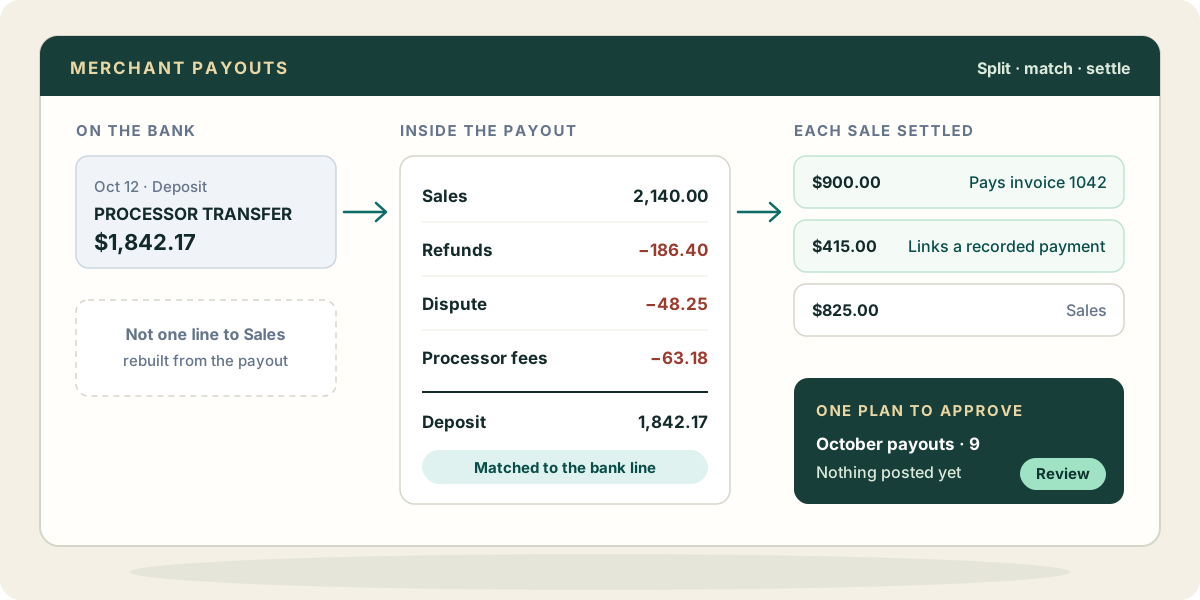
For Stripe and Square, each payout becomes a deposit split into its parts. Stripe: sales, refunds, disputes, fees and adjustments. Square adds sales tax, tips and loan repayments, across every location. Each deposit is matched to the bank line it caused, so the bank line and the payout post as one entry instead of two.
Charges are settled before they become sales. By default, Zeno checks each charge against the books: an existing undeposited payment is linked to the deposit; an open invoice gets a payment applied to it, then deposited; anything else is a sale. When a charge could be one of several invoices, it stays a sale with a note naming the candidates. Zeno does not guess. Your AI sees every transaction and what Zeno proposed for it, and can direct an ambiguous one to the right invoice. A client whose charges are all retail sales can be set to skip the invoice matching.
For Helcim, Zeno books through a clearing account, because that is how the money actually moves. Each card batch goes into clearing as a deposit. Each Helcim transfer on the bank comes out of clearing, matched to the run of batches it carried. Helcim’s fee debits go to fees as they come off the bank, except one that looks too large against recent sales, which is held for you to look at. When it is all posted, the clearing account sits at what is still in transit, which is the number it should show.
Everything arrives as a plan. You read it, trim it, and approve it; nothing posts before that. And the built-in merchant clearing check tells you, for any client, which clearing accounts have not washed to zero.
What your AI brings from elsewhere
The processor’s own data reaches Zeno directly. What your AI can add comes from the other things it is connected to.
- Mail. A dispute notice or a chargeback email explains a negative line before you have to ask the client.
- Files. A client’s price list or event schedule in Drive makes sense of a spike in sales, or of a day of refunds after a cancelled event.
- Other processors. If the client also sells through a platform Zeno does not read, your AI may be connected to it and can bring its payout report into the conversation, as evidence for an entry you approve.
Those come through your AI and its connectors, not through Zeno. Zeno reads Stripe, Square and Helcim, and the bank.
Where it stops
Zeno never moves money and never touches the processor account. A Helcim payout is not sent to Zeno on Windows; its clearing model is cloud only for now. And a charge Zeno cannot settle with confidence stays a sale with a note until a person decides.