
Report it. We will answer.
Zeno holds credentials to other people's general ledgers. That obliges us to be reachable, specific, and quick when someone finds a problem. This page is the standing invitation and the commitments that come with it.
How to report a vulnerability.
Email security@zenofirm.com. You do not need an account, a prior relationship, or a formal write-up. A short description and a way to reproduce it is enough to start.
If a report involves data belonging to a specific firm or client, say so and stop there. Do not access, download, or retain it to prove the point.
- 01Acknowledgement within two business days
A human replies confirming we received it and who is looking at it.
- 02An assessment within ten business days
Whether we could reproduce it, how we rate the severity, and what we intend to do.
- 03Notification when it is fixed
We tell you what shipped. If we decide not to act, we tell you that instead, and why.
- 04Credit if you want it
We are glad to name you when a report leads to a change. We will not name you without asking.
What we ask, and what we promise.
Please do
- Test against your own account and your own connected company
- Give us reasonable time to fix an issue before publishing
- Report promptly once you understand the impact
- Stop at proof of access; do not read or exfiltrate real data
Please do not
- Access, modify, or delete another firm's or client's books
- Run denial-of-service, spam, or automated load testing against production
- Use social engineering or physical intrusion against our staff or vendors
- Post a working exploit publicly before a fix is available
If you follow the above, we will treat your research as authorised, will not pursue legal action over it, and will work with you rather than around you. We do not currently run a paid bounty programme.
Where client data lives, in one paragraph.
Firms ask what to tell clients before connecting their books. This paragraph is accurate as of today and yours to adapt. It describes Zeno only; your AI provider’s terms cover what your assistant does with the answers it receives.
We do not show certification badges we have not earned. For a vendor questionnaire or our data processing addendum, emailsecurity@zenofirm.com.
We use Zeno (Zeno Services, LLC) to prepare bookkeeping work in your QuickBooks Online company. QuickBooks remains your accounting record. Zeno holds the connection to QuickBooks and keeps working copies of your ledger data, bank activity received through Plaid, and documents we send it, in the United States, in storage separated from every other firm’s. The AI assistant we use works through Zeno and never connects to QuickBooks itself. Every new entry is reviewed and approved by a person at our firm before it is posted, and every posting is recorded and can be reversed. Zeno does not train AI models on your data, does not sell it, and deletes its copies after we remove your company from Zeno.

The controls behind the promise.
Security posture is not a certification we can wave at you today. It is a set of specific decisions, and these are ours.
Every firm's data lives in its own database schema. Cross-firm access is not a permission we grant carefully. It is a boundary enforced by the storage layer.
QuickBooks tokens are held under envelope encryption and refreshed in a rotation-safe way. They are never exposed to a connected AI client.
The Zeno MCP server sits behind OAuth 2.1 with dynamic client registration, over HTTPS only. You authorise a client; you can withdraw that authorisation.
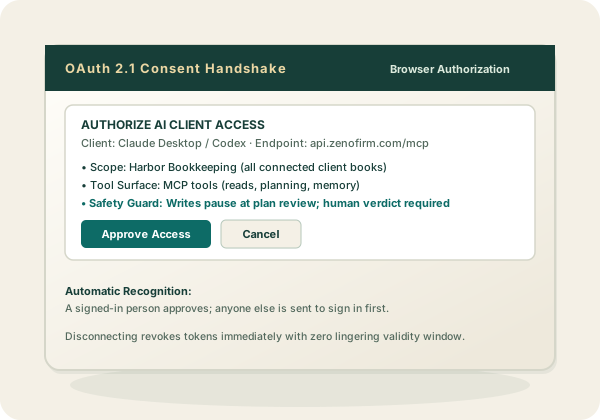
The control that matters most is not cryptographic. A person approves the exact batch, and every run keeps a reversal path.
Accounts, customers, vendors, employees, products and services, classes, locations, terms and payment methods are created, changed and retired only through a plan a person approves. There is no direct tool an AI client can call to rename a vendor or retire a customer, because a name write changes every check and every picker.
Zeno's tools do not take a vendor's tax id, an employee's Social Security number or a date of birth: in the cloud workspace, and in the Windows app from version 1.14.0, they refuse them before anything is planned or stored, and the person enters them in QuickBooks itself. Keep them out of documents sent to the inbox too. In the cloud, when Zeno reads your lists it keeps only the last four digits of any tax id QuickBooks Online returns; the Desktop edition reports only whether a vendor has one on file. In the cloud, until 26 September 2026, a vendor's tax id could travel on a plan, masked and held for at most seven days until the run sent it; nothing new is held, and the last held value expires by 3 October 2026. On 14 September 2026 we checked every cloud firm's stored plans and journal rows: none had ever held one. Desktop builds before 1.14.0 could carry one on a plan in the workstation's own journal; 1.14.0 empties that on its first start.
Zeno does not train AI models on connected client data, and does not sell or share it for advertising.