
The job today
The count happens on a Saturday, after close. Two people with clipboards, or a phone app that exports a spreadsheet, or a printout of the item list with numbers written beside each line. By Monday it lands on the bookkeeper’s desk as a file with 180 rows, half of them spelled the way the warehouse says them rather than the way QuickBooks does.
Then it gets typed. Open the inventory adjustment screen, pick the account, find the item, look up what QuickBooks thinks is on hand, type the new quantity, check the difference, next item. Somewhere around row 90 the coffee is cold and “Ethiopia 5lb” and “Ethiopia 12oz” start to look alike. A sale rang through on Sunday, so the on-hand number QuickBooks shows is no longer the one the count was taken against. One item gets typed as how many were missing instead of how many were left, and the shelf of 40 becomes a shelf of 3.
None of it is hard. It is a day of careful typing, and the mistakes it produces look like any other adjustment until the next count disagrees.
With Zeno
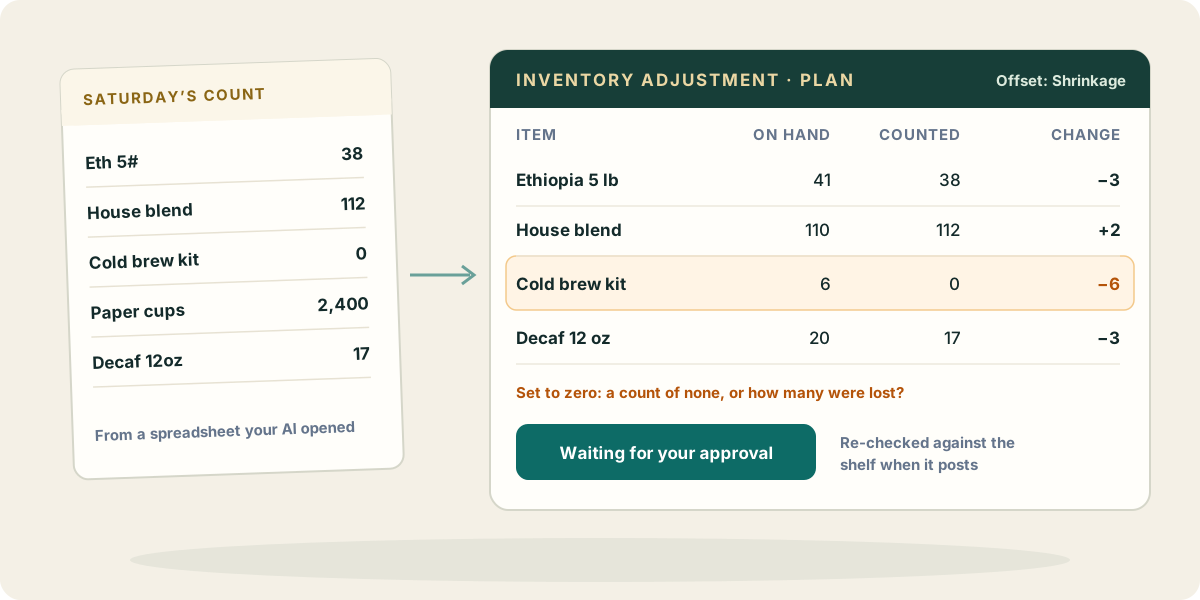
Your AI reads the count sheet and prepares the adjustment through Zeno. You read one plan and approve it.
Each line of the plan says what kind of number it is. “The shelf holds 190” and “ten fewer” are different instructions that produce different stock, so Zeno keeps them apart: a counted quantity is turned into a difference against the on-hand figure Zeno holds for that item, and both numbers are on the plan for you to read. An item appears once per adjustment, because two counts of one shelf can’t both be true.
Before you see the plan, Zeno checks it:
- Below zero. A line that would leave an item with less than nothing on hand carries a warning.
- Set to zero. A count of zero is sometimes right and sometimes a “how many were lost” typed in the wrong column. Zeno asks you to look.
- The offset account. The loss or gain has to land somewhere other than the item’s own stock account. Zeno refuses that account as the offset and warns on a bank account, and suggests cost of goods sold or a shrinkage expense.
- Nothing to move. A line where the count matches the books is refused, so nothing posts an empty adjustment.
Then there is the Sunday sale. When you approve, Zeno reads each counted item from QuickBooks again before posting. If the shelf moved between the plan and your click, that line is refused by name and the plan is made again against today’s figure, so the books end up holding the count you approved and not a number that was right on Saturday. A write-off given as a difference (“three broke”) means the same thing whatever the shelf holds, so it isn’t re-checked.
Purchase orders work the same way: your AI drafts them as a plan, and they post as records in QuickBooks once you approve. Zeno doesn’t send them to the vendor and never pays anything.
What your AI brings from elsewhere
- The count file itself. Whether it lives in Google Drive, OneDrive or an attachment in your mail, your AI can open it through its own connectors. Zeno doesn’t connect to those places; your AI hands it what it read.
- The warehouse’s names. A tab in the same spreadsheet that maps “Eth 5#” to the QuickBooks item is worth keeping. Your AI uses it, and anything it can’t match comes back as a question rather than a new item.
- Receiving notes. The email from the driver about the damaged cases, or the calendar note that a delivery arrived after the count started, explains a variance before you have to ask.
Where it stops
Inventory adjustments need QuickBooks Online Plus or Advanced, and Intuit offers them in the United States only. QuickBooks Online moves inventory value only through quantity, so an adjustment changes counts, not unit costs. Service and non-inventory items can’t be adjusted. And deciding whether a large variance is a miscount or a loss is still a conversation with the person who counted.