
The job today
Bills arrive everywhere. Some come to the client’s accounts payable mailbox, some to the owner’s personal email, some as a photo in a text message, and a few as paper that someone scans on Friday. You download each PDF, open QuickBooks, pick the vendor from a list where “Sysco”, “SYSCO Corp” and “Sysco Foods” all exist, key the date, number, due date and lines, attach the PDF, and save. Forty times.
The quiet problems are the expensive ones. The same invoice arrives twice, once from the vendor and once forwarded by the owner, and it gets entered twice. A vendor’s statement at month-end lists an invoice nobody ever saw. A bill shows as open in QuickBooks that the owner paid by card in the store. And every Thursday someone builds the payment list by hand from the aging report, checking credits and due dates, so the owner can approve it over text.
With Zeno
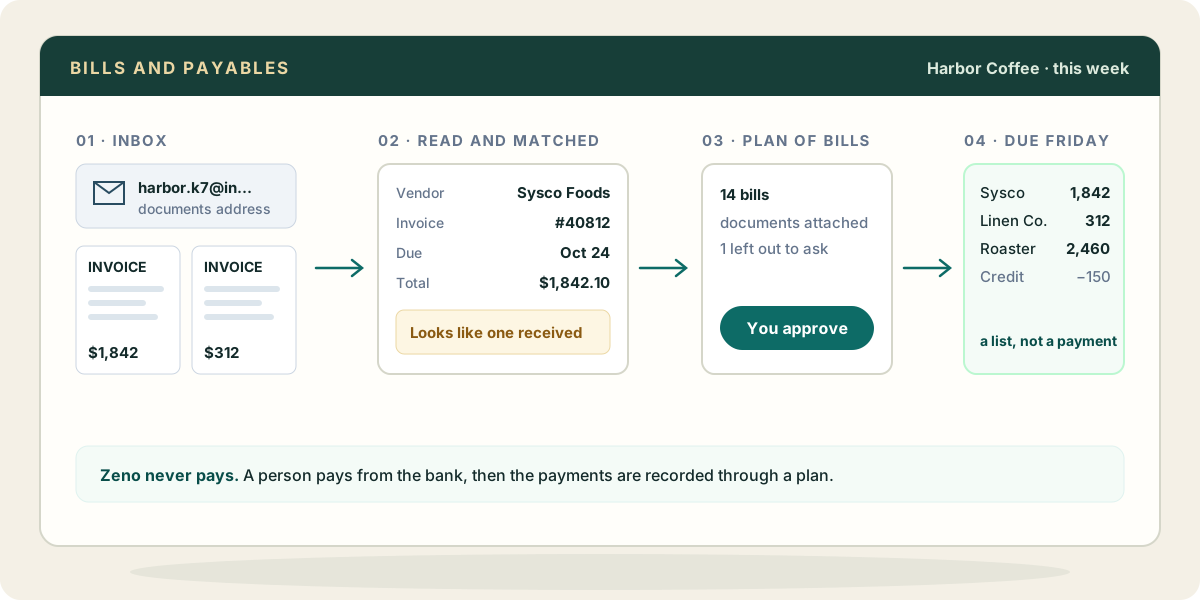
Each client company has its own documents address. Forward the mailboxes there, or upload files, and every document lands in Zeno’s inbox. Zeno reads it with machine text recognition on its own servers, not an AI model: the total, the date, the invoice number, and the vendor matched against the client’s QuickBooks vendor list. A reading Zeno made itself is marked unchecked until someone, or your AI, has looked.
Then you ask your AI, through Zeno, to enter the week’s bills. It reads each document, settles what the machine reading could not, and prepares the bills as one plan, each linked to its document so the posting carries its evidence. A document that looks like one already received is flagged, and anything Zeno already posted is marked before you approve. A vendor that does not exist yet is created inside the same plan, so “Sysco Foods” does not become a fourth Sysco. You read the plan, leave out the bill you want to ask about, and approve the rest.
When the vendor’s statement arrives, hand it to your AI and ask what disagrees. Your AI reads the lines off the statement, and Zeno checks them against the vendor’s bills, credits and payments in QuickBooks itself: what the statement lists that the books do not have, what the books hold that the statement leaves out, a bill that looks entered twice, and amounts that differ. An invoice the client paid by check or card without entering a bill counts as paid, not missing. Give it the statement’s ending balance and Zeno sets it beside what QuickBooks shows owed on that date, read live. The check changes nothing; the fix comes back as a plan.
For the payment run, your AI reads the open bills live from QuickBooks, with due dates and any vendor credits waiting, and gives the person who pays a list. Once the money has gone out from the bank or the bill-pay service, the bill payments can be recorded through a plan, against the right bills.
What your AI brings from elsewhere
Through its own connectors, not through Zeno, your AI can often settle what a bill alone cannot:
- Mail. The purchase order or quote in Gmail or Outlook shows whether the invoice matches what was agreed, and which job it belongs to.
- Files. A contract in Google Drive or OneDrive says the payment terms, so the due date on the bill can be checked rather than copied.
- Calendar. The vendor’s delivery or service date on the calendar tells you which month the expense belongs in.
- A spreadsheet. If the client approves bills in a shared sheet, your AI can read which ones the owner has signed off before you plan them.
Where it stops
Zeno never pays a bill or moves money, and a bill that asks for new bank details or an urgent payment is shown to you as what the document says, never acted on. The decision to pay, and the payment itself, stay with a person.
Bills need a QuickBooks Online plan that includes them: Essentials, Plus or Advanced. See what Zeno can do on each plan.