
Double brings its AI to your books. Zeno lets you bring yours.
Double (formerly Keeper) is an all-in-one month-end close and practice management platform with AI built into its own interface. Zeno is an AI bookkeeping runtime for the assistant you already work with every day—Claude, ChatGPT, or Muse—keeping the human firmly in charge of what posts.
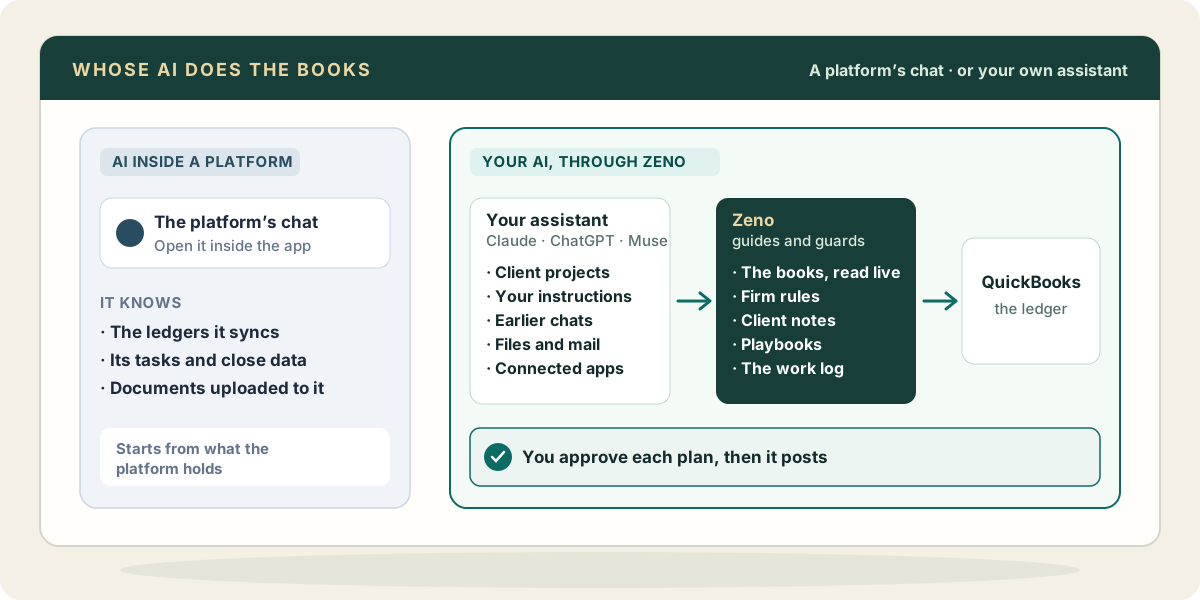
The same goal, a different architecture.
Both products keep a person in charge of what posts. The difference is whose AI does the work, where that AI lives, and what it can touch. This is a reading of Double’s published pages and documentation, not a test of its product; a feature not mentioned here may still exist.
| Question | Double | Zeno |
|---|---|---|
| Where the AI lives | Inside Double’s web app. Ask Double, AI Bank Feeds and AI Transactions are chat and workflow interfaces built directly into the platform. Source | In the assistant you already use: Claude, ChatGPT or Muse. Bookkeeping happens in the same conversation where you read client emails, inspect PDFs and organize your work. |
| Model Context Protocol (MCP) | Practice and task administration. Double’s remote MCP server (api.doublehq.com/mcp) lets assistants reassign tasks, check teammate activity, query close checklists, and set calendar reminders. Source | The bookkeeping engine itself. 145+ tools for QuickBooks Online and QuickBooks Desktop that code bank feeds, split multi-leg merchant payouts, stage bills and journal entries, and draw plans for human approval. |
| What the AI knows | What Double holds: client ledgers, task checklists, close data and uploaded documents. Suggestions draw from ledger history and vendor lookups. Source | Everything your assistant already knows (prior chats, project instructions, client files, connected apps like Gmail or Drive), plus live QuickBooks read models, firm coding rules, client notes and work logs. |
| How you steer it | Chat prompts in Double, bank-feed rules, and saving a completed transaction as a reusable skill. Prompt templates for summaries. Source | Natural conversation with your assistant: talk it through, correct it, or set standing instructions in a project. Settled decisions become draft firm rules or client notes in Zeno for a person to confirm. |
| Feature tiers & gating | AI Bank Feeds and Ask Double start on Core ($10/client/mo). Conversational AI journal entries, AI bills, accruals, allocations and flux analysis require the Scale plan ($50/client/mo). Source | Every bookkeeping workflow, rule, memory feature and safety control is included across all plans. No feature gating, prompt markups or limits on postings. |
| Price | Per client, per month: Core is $10, Plus is $25 and Scale is $50. Optional firm add-ons include integrated email ($10/mo) and tax suite ($200/mo). Source | Published capacity pricing: Zeno for Firms starts at $149/mo for three QuickBooks Online client books, with unlimited team members. Additional books start at $29/mo and scale to $12/mo. Windows app licence from $449 once. |
| Ledgers supported | QuickBooks Online and Xero for firms; Sage Intacct and NetSuite for internal finance teams. No QuickBooks Desktop support. Source | QuickBooks Online, plus complete local on-premises support for QuickBooks Desktop through the Windows app (company files stay on the PC). No Xero today. |
| Review, drift & reversal | Review before posting in Double; adjustments happen directly in the ledger afterward. Every close is signed off by a person. Source | Every write originates in a staged plan with a cryptographic SHA-256 fingerprint. Zeno verifies the ledger hasn’t drifted before posting, and posted batches can be reversed with one click. |
| Practice management & portal | A complete close checklist, task management, branded client portal for uncategorized transaction questions, CRM, team time tracking and 1099 filing. Source | Pure bookkeeping runtime and firm memory. Client questions answered by secure link; no CRM or practice portal. Keeps the practice software you already have. |
Sources: Double’s home page, Ask Double, AI workflows, AI bank feeds, AI transactions, integrations, pricing plans and help center, read October 21, 2026. What Zeno connects is on the connectors page.
It already knows the messy details.
Most of what a bookkeeper knows about a client never reaches the ledger: the owner who pays the landscaper in cash, the email explaining an unusual deposit, the equipment lease in a shared drive. That context lives in your working conversations, notes and files, where your assistant already is.
A chat widget inside another platform only knows what that platform syncs. When you bring your own assistant to Zeno, it combines your client files and instructions with live QuickBooks data, firm rules, and memory from earlier sessions.
A month in Claude or ChatGPT
You keep a project for each client with its standing instructions. You drop in the statement and the owner’s note about a new vehicle. Your assistant reads the bank lines through Zeno, codes them with the firm’s rules, handles settlement splits, flags the items it cannot place, and shows the plan right there in the chat. You click to approve, and it posts.
Next month, a colleague picks up the same client in their own assistant and starts from the same confirmed rules, notes and durable work log.
Common questions
Is Double the same application as Keeper?
Yes. Keeper rebranded to Double in 2024–2025. The core features—month-end close checklists, file reviews, 1099 preparation, and the client portal for uncategorized transaction questions—remain central to Double, now paired with in-platform AI tools.
Doesn’t Double connect to Claude and ChatGPT through MCP too?
It does, but for a completely different purpose. Double’s published MCP server (api.doublehq.com/mcp) provides tools to manage practice tasks, reassign items when team members are away, track team performance scores, query close checklists, and sync calendar reminders. It does not do ledger work.
Zeno’s MCP server is the bookkeeping runtime: it gives your assistant 145+ tools to stage bank feeds, reconcile merchant payouts, plan journal entries, draft bills, verify ledger drift, and post approved batches with one-click reversal.
Can I use Double and Zeno together?
Yes, and many practices do. Double excels as a month-end close checklist and branded client portal for getting client answers. Zeno excels at the bookkeeping work your assistant does. Both connect to QuickBooks Online, so practices can keep Double for close checklists and client questions while using Zeno to prepare and post the books.
Why are some Double AI features restricted to the Scale tier?
Double packages its tools into client tiers. Core ($10/client/mo) includes AI Bank Feeds and Ask Double. Plus ($25/client/mo) adds AI financial summaries and receipts. Conversational AI transaction drafting (journal entries, bills, accruals, allocations, and flux analysis) is gated to the Scale tier at $50/client/month. In contrast, Zeno includes all transaction workflows, firm rules, memory, and reversal controls across all plans without feature tiering.
Does Double support QuickBooks Desktop?
No. Double supports QuickBooks Online and Xero (and Sage Intacct/NetSuite for internal finance teams). Zeno supports both QuickBooks Online and QuickBooks Desktop. For QuickBooks Desktop, Zeno runs as a standalone Windows application where the client company file stays strictly on your local PC.
Which assistants work with Zeno?
Claude, ChatGPT and Muse, on the subscription you already pay for. The AI page outlines the connection setup for each.