Teach your AI a bookkeeping procedure once. Run it with one command.
A skill is your procedure written down for Claude: how you code a card feed, what you check at month-end, who gets a reminder. Type /month-end-close and it runs your way, in QuickBooks, through Zeno. It stops at a plan for you to approve.
YOUR INSTRUCTIONPrepare this month’s card charges.
ZENO + YOUR SAVED PROCEDURE
Read the charges and source documents
Apply the company’s confirmed rules
Hold the entries that need more information
✓
A plan ready for you
Review the coding. Approve what is ready.
Review
The procedure prepares the work. You decide what posts.
What a skill is
A text file with your procedure in it.
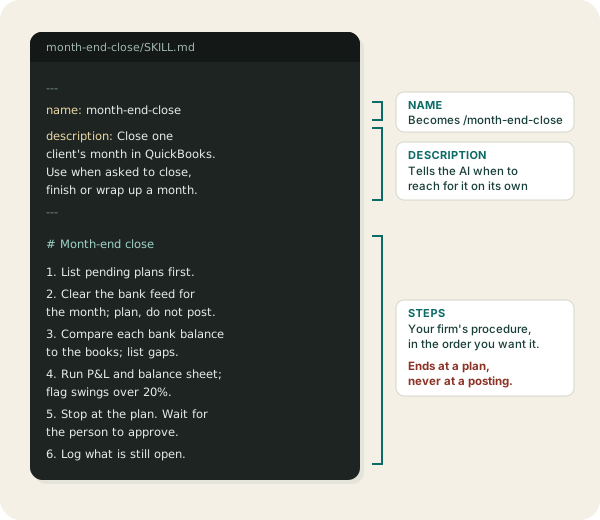
Each skill is a folder holding one file, SKILL.md. The top says what the skill is called and when to use it. The rest is the steps, written the way you would brief a new bookkeeper.
The name becomes the slash command. The description is how the AI knows to use the skill when you just ask: “close September for Northwind” finds month-end-close without the slash.
A skill knows nothing about QuickBooks by itself. Zeno gives the AI what it needs to do the steps: your books, the client’s rules and history, the bank feed, the inbox. And the rule that nothing posts until a person approves it.
How it runs
The skill prepares. You decide.
A skill can do every step up to the plan, even on a schedule overnight. Posting is the one step it cannot take. That is what makes it safe to hand the AI a whole procedure.
Examples
Eight bookkeeping skills to copy.
Each one is a complete SKILL.md, written for Zeno’s tools. Copy it, change the steps to match how your firm works, and install it below.
Bookkeeper
/code-card-feed
Code the card feed
Reads the new card and bank lines, applies the client’s confirmed rules, codes the rest from history and holds back what needs a person.
You type/code-card-feed Northwind, March, Amex 1009
Show the SKILL.md
---
name: code-card-feed
description: Code new bank and card lines for one client in QuickBooks through Zeno. Use when asked to code, categorize or clear the bank feed or card charges.
---

1. Call qb_list_plans. If a feed plan for this account is waiting, show it instead of starting over.
2. Call qb_bank_feed for the account and period named.
3. Call qb_list_rules. Lines a confirmed rule covers are coded by that rule.
4. For the rest, call qb_suggest_coding and use the client's own history. Do not guess an account the client has never used.
5. Hold back anything new or unclear: a vendor never seen before, a split, a personal-looking charge. List them with the question you would ask.
6. Call qb_plan_feed for the lines you are sure of. Stop there and give me the plan link.
7. If you coded the same vendor the same way twice, offer one draft rule.
8. qb_log_work: what was coded, what is held and why.
Bookkeeper
/match-receipts
Match receipts to charges
Pairs each receipt in the inbox with the charge it belongs to, attaches it, and lists the receipts with no charge and the charges with no receipt.
You type/match-receipts Northwind, last month
Show the SKILL.md
---
name: match-receipts
description: Match receipts in the Zeno inbox to card charges and transactions in QuickBooks. Use when asked to match, attach or chase receipts.
---

1. Call qb_inbox for receipts not yet linked.
2. Call qb_match_receipts for the period. Question any match where the merchant on the receipt is not the one on the charge.
3. Show the proposed pairs in one table: receipt, charge, amount, date gap.
4. After I say yes, link them with qb_link_receipt.
5. List receipts with no charge, and charges over $75 with no receipt.
6. qb_log_work: matched, unmatched, and what is still missing.
Bookkeeper
/enter-bills
Enter bills from the inbox
Turns the bills that arrived by email into one batch of entries, coded the way the vendor was coded last time, ready for review.
You type/enter-bills Northwind
Show the SKILL.md
---
name: enter-bills
description: Enter vendor bills that arrived in the Zeno inbox as one reviewed batch in QuickBooks. Use when asked to enter, record or post bills.
---

1. Call qb_inbox for unprocessed bills. Read each document; never type a figure you cannot see on it.
2. Find each vendor with qb_find_vendors. A vendor that does not exist goes through qb_plan_names first, never created directly.
3. Code each bill the way that vendor's last bill was coded, unless a rule says otherwise.
4. Watch for duplicates: same vendor, amount and invoice number already in the books.
5. If a bill asks to change bank details or pay someone new, do not enter it. Tell me what it asks.
6. Call qb_plan_batch with every bill. Stop and give me the plan link.
7. qb_log_work: bills entered, held, and why.
Firm
/month-end-close
Close the month
Runs your close checklist for one client: feed cleared, bank balances checked against the books, statements reviewed, entries proposed.
You type/month-end-close Northwind, September
Show the SKILL.md
---
name: month-end-close
description: Close one client's month in QuickBooks through Zeno. Use when asked to close, finish or wrap up a month.
---

1. Call qb_list_plans. Anything reviewed but not applied comes first.
2. Check qb_list_playbooks for this client's close playbook. If one is confirmed, follow it instead of these steps.
3. Clear the bank feed for the month with the code-card-feed steps. Plan, do not post.
4. Call qb_bank_balance for each account and compare it to the books. List every gap with its amount.
5. Run qb_report for the profit and loss and balance sheet. Flag any line that moved more than 20% from last month.
6. Propose adjusting entries (accruals, prepaid, depreciation) with qb_plan_batch. Stop at the plan.
7. qb_log_work: what is done, what is waiting on the client, what is waiting on me.
Owner
/ar-follow-up
Chase what customers owe
Pulls the receivables aging live, ranks who to call, and drafts a short note for each overdue customer for you to send.
You type/ar-follow-up
Show the SKILL.md
---
name: ar-follow-up
description: Review overdue customer balances from QuickBooks and draft follow-ups. Use when asked who owes money, what is overdue, or to chase invoices.
---

1. Run qb_report for the receivables aging, as of today. Never add up invoices to make one.
2. Rank customers by amount over 30 days.
3. For the top five, list the open invoices with qb_find_transactions.
4. Draft a two-line reminder for each. Show them to me; send nothing.
5. qb_log_work: who is overdue and what was drafted.
Owner
/weekly-owner-brief
The Monday brief
Cash in the bank, what came in, what went out, bills due this week and anything unusual, in one short answer with the numbers behind it.
You type/weekly-owner-brief
Show the SKILL.md
---
name: weekly-owner-brief
description: Give the business owner a short weekly picture of the books. Use when asked how the business is doing, for a weekly summary, or a Monday brief.
---

1. Call qb_bank_balance for every bank account. Quote the balance as read.
2. Run qb_report for last week's profit and loss and compare it to the four weeks before.
3. Run qb_report for payables due in the next seven days.
4. Name one thing that looks unusual and the transactions behind it.
5. Keep it under 150 words. Every figure comes from a report you ran just now.
Firm
/client-checkup
Check a client’s books
Runs Zeno’s built-in check-up and turns what it finds into proposed fixes and questions for the client, ranked by what would mislead most.
You type/client-checkup Northwind
Show the SKILL.md
---
name: client-checkup
description: Check the health of one client's QuickBooks books through Zeno. Use when taking on a client, before a close, or when asked what is wrong with the books.
---

1. Call qb_run_check with the check check-up for this client. Zeno runs every built-in check and hands back what it found.
2. For each finding, show the amount and the transactions behind it.
3. Sort by what would mislead the client most if left alone.
4. Propose fixes for the clear ones with qb_plan_cleanup. Stop at the plan.
5. Draft questions for the client on the rest; do not send them.
6. qb_log_work: the findings, what was planned, what is waiting on the client.
Bookkeeper
/dedupe-vendors
Clean up duplicate vendors
Finds vendors that are one company under two names, picks the one to keep, and makes sure every future entry lands on it.
You type/dedupe-vendors Northwind
Show the SKILL.md
---
name: dedupe-vendors
description: Find duplicate vendors in QuickBooks and retire the extras through Zeno. Use when asked to clean up, dedupe or merge vendors.
---

1. Call qb_find_vendors and group names that differ only by punctuation, case, "Inc"/"LLC", or a store number.
2. For each group, show the transaction count and total for every name.
3. Keep the name with the most history.
4. Show me the groups and wait for my yes on each one.
5. For each group I approved, call qb_retire_duplicate. It points the old spelling at the survivor and plans retiring the duplicate. Give me the plan links.
6. qb_log_work: which names now resolve to which.
Install
Add a skill to the AI you use.
Connect Zeno first (Claude, ChatGPT), so the skill has your books to work from.
Claude, on the web or the desktop appSave the example as SKILL.md in a folder with the skill’s name, zip the folder, then upload it from Settings, under Capabilities → Skills. Claude reaches for it when your request matches its description, or when you name it.
Claude CodePut the folder in .claude/skills/ in your project, or ~/.claude/skills/ to have it everywhere. Type / and the skill’s name to run it: /month-end-close.
CodexCodex reads the same SKILL.md format. Run one by name with $month-end-close, or let Codex pick it up from the description.
ChatGPT, or a whole firmSave the procedure in Zeno as a playbook instead. It lives with your firm, a person confirms it before it runs, and any chat connected to Zeno runs it: “Run the month-end-close playbook for Northwind.”
Using QuickBooks Desktop? Zeno on Windows comes with five skills already written: setup, analysis, batches, corrections and continuity.
Skill or playbook
Skills are yours. Playbooks are the firm’s.
Try a procedure as a skill. When the whole team should follow it, save it in Zeno as a playbook.
SkillZeno playbook
Where it livesOn your computer or in your Claude accountIn Zeno, with the firm’s clients
Who can use itYouEveryone in the firm
Works inClaude, Claude Code, CodexClaude, ChatGPT and any chat connected to Zeno
Before it runsNothing; you wrote itA person confirms it
Knows the clientOnly what you wrote into itBrings the client’s rules and notes with it
Questions
Skills and slash commands, answered.
What is a skill in Claude?
A skill is a folder with a SKILL.md file in it: a name, a one-line description of when to use it, and the steps. Claude reads the description of every skill you have installed and loads the full steps only when your request matches, so you can keep dozens without crowding the conversation.
What is a slash command?
A slash command runs a skill by name. In Claude Code you type /month-end-close and the skill’s steps load straight away. In the Claude app you can name the skill in your message, and it also runs on its own when the request matches its description.
Can a skill post entries to QuickBooks on its own?
Not through Zeno. A skill only tells the AI what to do. Zeno is what reaches QuickBooks, and every change goes into a plan that a person reviews and approves before anything posts. A skill that says “post it” still stops at the plan.
Do skills work with QuickBooks Online and QuickBooks Desktop?
Yes. With QuickBooks Online, Zeno lets the AI reach your books over the internet. For QuickBooks Desktop, Zeno runs on the Windows computer that has QuickBooks and comes with five skills of its own: setup, analysis, batches, corrections, and picking up where the last session left off.
What is the difference between a skill and a Zeno playbook?
A skill belongs to one person and one AI app. A playbook belongs to the firm: it is stored in Zeno, a person confirms it before it can run, and it works in Claude, ChatGPT or any other chat connected to Zeno. Write a skill to try a procedure; save it as a playbook when the whole team should follow it.
Can a skill run on a schedule?
The preparation can. Claude and ChatGPT both run saved prompts on a timer, and the prompt can be as short as “Run the code-card-feed skill for Northwind.” The plan waits for you in the morning. The approval never runs on a schedule.
14 DAYS FREE · NO CREDIT CARD · COMPLETE PRODUCT
Run your first skill on real books.
Connect QuickBooks, add one skill, and read the plan it leaves you.