
The job today
The card statement closes. Somewhere between forty and four hundred charges are sitting in the feed, and a fair share of them are a merchant name and an amount with nothing behind them. “AMZN Mktp US.” “SQ *BLUE DOOR.” “TST* 41 GRAND.” You know roughly who carries which card, so the chasing starts.
An email to the owner asking about the three Amazon orders. A text to the
project manager about the restaurant charge. A message to the office manager,
who says the receipts are “in the folder,” which turns out to be a phone’s
camera roll. Some receipts arrive by forward, some as photos with half the
total cut off, some as PDFs named scan0042.pdf. You open each one, find the
charge it belongs to, attach it, and code it. The charge two days later from
the same merchant for almost the same amount is the one that eats ten minutes.
The quiet failures here are the expensive ones. A receipt attached to the wrong charge looks exactly like a right one. A charge nobody explained gets coded to Office Supplies because something had to be. A personal purchase on the company card waits until year-end to be noticed. And the follow-up lives in your inbox, so when someone else picks up the client next month, none of it is there.
With Zeno
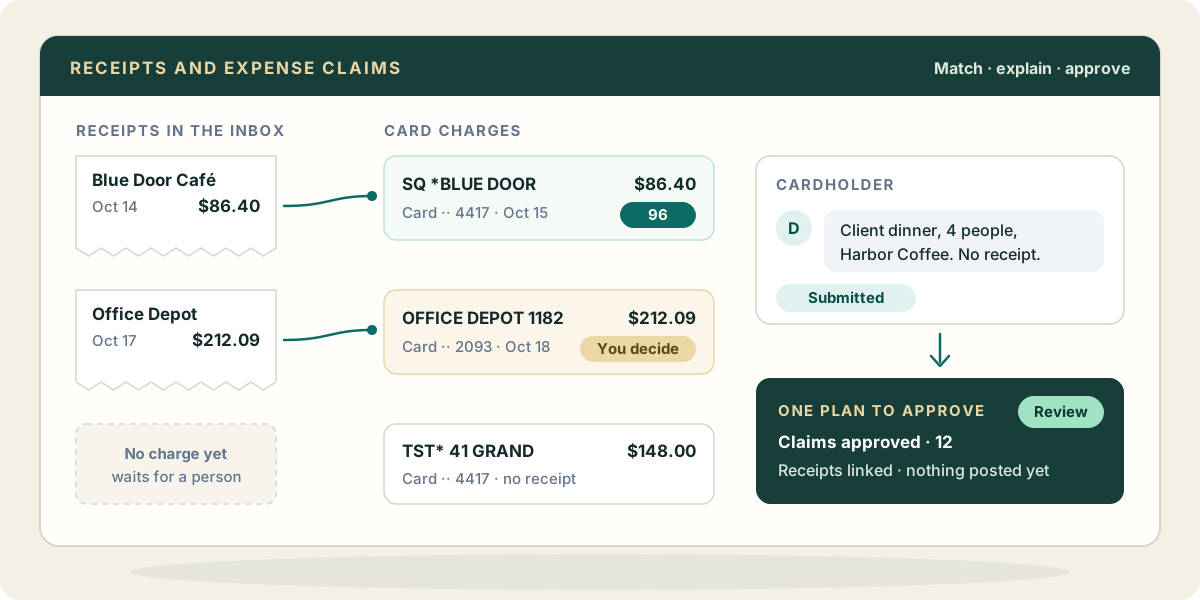
Card and bank charges come into Zeno from the bank connection or a statement file. Receipts arrive at the client’s documents address, forwarded or uploaded. Zeno reads the text on each one and pulls out the total, the date and the vendor.
Ask your AI to match them, and it scores every receipt against the unlinked card charges: amount first, then how close the dates are (settlement lag is expected), then the merchant name with processor prefixes stripped, then the card’s last four. A charge more than about ten percent off the receipt total is never a match. Only a pair that clearly beats every other candidate is offered as safe to link on its own; anything close or ambiguous comes to you as a proposal, and an unmatched receipt simply waits. Links are recorded in Zeno, and once the charge posts, the receipt is attached to the QuickBooks transaction.
For company cards, turn on expense claims for the card account and record who carries which card. Each cardholder gets a page that shows only their own charges. They attach the receipt or say why there is none, and submit. They do not need the console or an AI, and they cannot approve their own claim.
A reviewer then works one queue: what is submitted, who it belongs to, its receipt, its coding and the conversation so far. Approve, or send it back with a question, singly or as a selection. Sending back needs a reason, and the reason lands in the claim’s conversation so the cardholder knows exactly what to fix.
Two approvals, two questions. Approving a claim says the expense was legitimate. It posts nothing. The postings come in a plan, built from the charges, that needs its own approval: do these entries look right? And a claim is a lane, not a gate. A charge whose claim is unfinished can still be planned and posted when you decide it should be, so one slow cardholder never holds up the month.
If you only want cards named and defaulted, without claims, Zeno can do that too: each card on a shared feed gets a name and a default account, suggested on its charges that no rule covers.
What your AI brings from elsewhere
Your own AI is often connected to more than Zeno, and those connections fill the gaps a receipt leaves.
- Mail. If your AI reaches your Gmail or Outlook, it can find the order confirmation for that Amazon charge and read the line items, or forward a missing receipt to the client’s documents address.
- Calendar. The restaurant charge on the 14th lines up with a calendar event: “Dinner with Harbor Coffee, 4 attendees.” That is the business purpose, and the attendees, in one look.
- Files. A shared Drive or OneDrive folder of trip receipts, or a travel itinerary, explains a week of airline, hotel and taxi charges together.
These come through your AI and the connections you gave it, not through Zeno. Zeno’s own sources are the bank and card feed and the documents address. What your AI finds elsewhere is evidence for you to weigh; the links and the postings still go through Zeno, and the postings still wait for your approval.
Where it stops
Zeno never reimburses anyone or moves money; repaying an employee happens wherever you pay people. It does not decide whether an expense is allowed under the client’s policy. And a receipt that cannot be matched with confidence stays unlinked until a person links it.