
The job today
Monday morning starts in the For Review tab. Northwind has 312 lines since last week across the operating account and two cards. QuickBooks has guessed at most of them, and most of the guesses are fine, which is the problem: you still have to look at each one to find the ones that are not.
So you work down the list. Amazon, Amazon, Amazon: one is printer toner, one is a client gift, one is the owner’s kitchen. A $1,200 transfer to savings shows up on the operating account, and the matching $1,200 on the savings account shows up separately, and if you add both you have just booked $2,400 of nothing. A Home Depot charge looks new, but the client entered it by hand last Thursday with a receipt attached, so adding it from the feed would double it. Bank rules handle the boring middle, until one rule set to auto-add catches a vendor it was never meant to, and posts it quietly for three months.
By the end the easy 290 took an hour and the hard 22 took two. Half of the hard ones become an email to the client, and the answers arrive on Thursday, after you have moved on to the next file.
With Zeno
Zeno cannot read the For Review tab; Intuit offers no outside app a way in. So each account comes to Zeno instead: the client connects the bank through Plaid, or you import a statement file, and you turn off QuickBooks’ own feed for that account so nothing arrives twice.
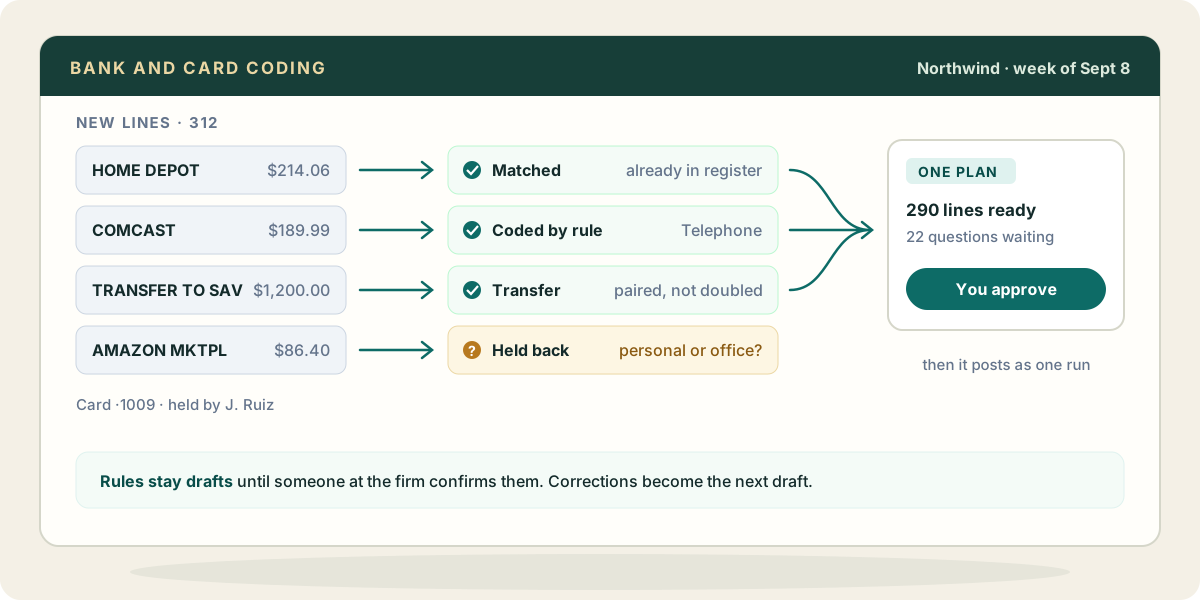
Then you ask your AI, working through Zeno, for the week. Before anything is coded, Zeno compares each line with the register: the Home Depot charge the client already entered comes back as a match to link, not a new entry. Lines that cross two fed accounts are paired as one transfer. Charges a confirmed rule covers are coded by that rule. The rest your AI codes from the client’s own history, how this vendor has been coded before, and the lines it is unsure of it holds back, each with the question it would ask.
On a company card, Zeno knows which card a charge came from by its last four digits, who carries it, and the default account for that card. The default fills in only when no rule does.
All of it comes back as one plan. You read it the way you would read a junior’s work: trim the line you disagree with, approve the rest, and it posts to QuickBooks as one run, with the questions still waiting beside it. When you correct a vendor twice, ask for a rule; it is saved as a draft with the lines it would have caught, and it applies on its own only when someone at the firm says so. The work log keeps what was coded, what was held back and why, so next Monday starts from there.
What your AI brings from elsewhere
The held-back lines are usually answered somewhere else, and your AI may already reach that place through its own connectors, not through Zeno:
- Mail. “Search Gmail for the Willow Street order confirmation around the 12th” turns a mystery $847 into a materials purchase for a named job.
- Calendar. A charge at a restaurant on the day the calendar shows a client lunch is a meal with a business purpose, and the memo can say whose.
- Files. A shared drive folder of the owner’s trip itinerary explains a week of card charges in another city.
- A spreadsheet the client keeps. Some owners track reimbursable purchases in a sheet; your AI can read it and mark which charges are theirs to repay.
Zeno still decides nothing from that evidence on its own. What the AI found goes into the plan as coding and a memo, and you approve it like everything else.
Where it stops
You still reconcile in QuickBooks: Zeno cannot mark QuickBooks Online lines as cleared or finish a reconciliation. It can show you what is missing or doubled against the statement first. Zeno never moves money, and a rule never becomes automatic without a person.