
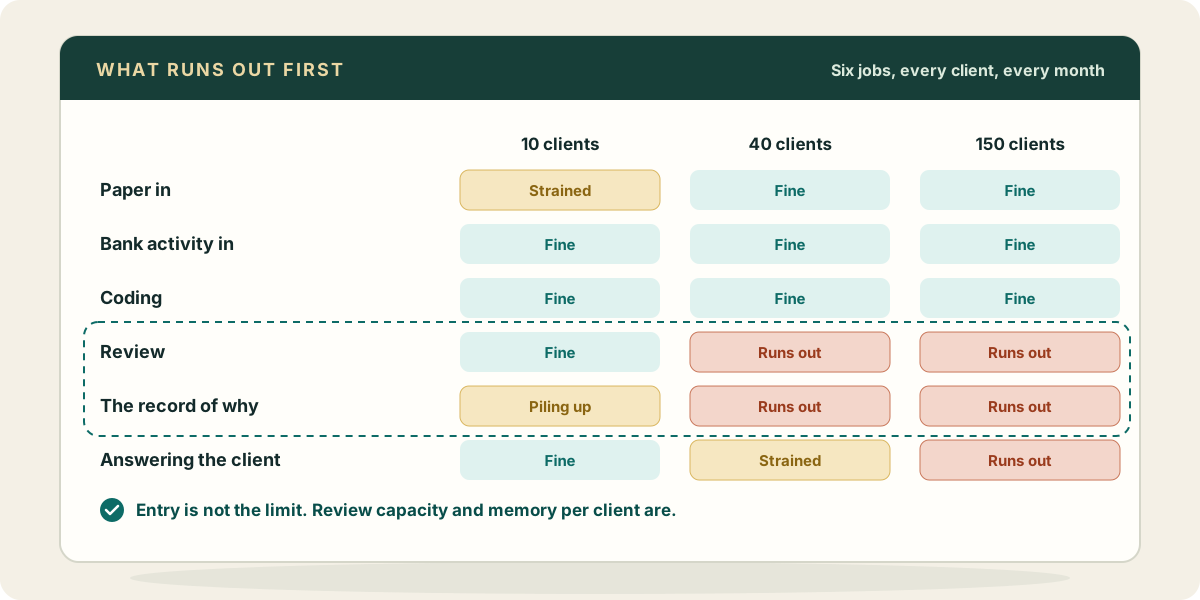
Ask a firm owner what limits how many clients the practice can carry and the first answer is usually data entry. Then you watch the practice for a month and it is rarely true. Entry got cheaper years ago: bank rules, receipt capture, imports. What the owner is actually short of is somebody who can look at a client’s month and say, with their name on it, that it is right. And when that person leaves or goes on holiday, what is missing is the reason behind last month’s decisions, not the decisions themselves.
This piece is about how the work of a multi-client practice actually splits, what breaks at roughly ten, forty and a hundred and fifty clients, and which kind of tool belongs where. It is meant to be useful whether or not you ever use Zeno.
The six jobs, for every client
However a practice describes itself, each client’s month comes down to the same six jobs.
- Getting the client’s paper in. Bills, receipts, statements, contracts, the photo of a handwritten invoice. They arrive by email, portal, text message and shoebox, usually late.
- Getting bank activity in. Every bank and card account, every payout from a processor, in a form you can code.
- Coding and preparing entries. Turning the paper and the bank lines into bills, expenses, deposits, transfers and journal entries against that client’s own chart of accounts.
- Review and approval. A second look, by someone accountable, before the work becomes the client’s books.
- The record of why. Why this vendor goes to Repairs and not Supplies, why that deposit is a loan and not revenue, who decided, and when.
- Answering the client. The owner who wants to know where the cash went, the question you need answered before you can code a line, the year-end conversation.
Every tool a practice buys sits on one or more of these. The trouble starts when a firm buys three tools for the first three jobs and assumes the last three will take care of themselves.
At about ten clients: one person holds it all
A practice of ten clients usually works because one or two people carry every client in their heads. They know the landlord who pays the plumber in cash, the restaurant that runs payroll through a separate account, the consultant whose “travel” is half personal. Review is the owner glancing over a junior’s work, or the owner doing the work and reviewing it themselves.
What breaks first here is the paper. Clients send things everywhere, and the month waits on the one receipt nobody can find. A document capture tool or a single forwarding address per client is the right first purchase at this size, and it is cheap.
What does not break yet, but is already accumulating, is the record of why. Nobody writes it down because nobody needs to. That is fine until the second bookkeeper arrives.
At about forty clients: review becomes the ceiling
Somewhere between twenty and fifty clients, the work stops fitting in one head. There are three or four people now, and each client has an owner inside the firm. The owner of the practice can no longer review every month line by line, so review becomes either a sample or a formality.
This is the size where firms notice that entry was never the constraint. Bank rules post the familiar lines. Imports bring the rest in. And then the work piles up in front of the two people allowed to sign off on it. Hiring another preparer makes the pile bigger, not smaller.
The other thing that breaks at forty is handover. A bookkeeper leaves and takes eleven clients’ worth of judgment with them. The new person opens the file, sees that a vendor was coded three different ways over two years, and has no way to know which was the decision and which was the mistake. They either ask the client again, which the client notices, or they pick one, which the reviewer may not.
So the two things a forty-client practice needs most are:
- Review that works in batches. A reviewer should be looking at a month of coding for one client as one thing: what was proposed, what rule or history it came from, what was held back and why. Approving a whole batch at once, after trimming the lines that need more information, is how one reviewer covers four preparers.
- Memory that belongs to the client, not to the person. The rule for that vendor, the fact that the owner’s car is a company asset, the note that this client closes on the fifth business day. Written down once, where the next person and the next month will find it.
Practice management software helps with the second half of this problem: deadlines, recurring tasks, who owns which client. It is worth having at this size. What it usually cannot hold is the bookkeeping memory itself, the rules and the reasons, because those belong next to the ledger, not next to the task list.
At about a hundred and fifty: consistency, and the client’s questions
A large practice has specialists, a review layer, and usually a written close process. What breaks now is consistency. Two teams close the month two different ways. A checklist exists, but it lives in a document that half the staff have not opened since onboarding.
And the clients’ questions become a real share of the workload. Owners want answers between closes: what was that charge, why is profit down, did the customer pay. Each question pulls a senior person out of review to look something up.
What helps at this size is a close process that is executed the same way for every client by whoever is doing the work, plus a way for clients and owners to get answers from their own books without a person running every report.
Where each kind of tool belongs
It is worth being plain about the division of labour, because a lot of buying mistakes come from expecting one tool to do another’s job.
- QuickBooks Online is the ledger. It holds the books the client and the tax preparer read. Payroll, the reconcile screen and closing the books in QuickBooks itself all stay there. Nothing should keep a second set of books beside it.
- Practice management holds the firm’s work: deadlines, assignments, engagement letters, time. It is about who does what and when.
- Document capture turns paper into data. Some firms need a dedicated tool; some only need a forwarding address per client.
- The preparation and review layer is where coding, entries, approval and the record of why live. This is the part most practices assemble by hand out of spreadsheets, bank rules and a reviewer’s memory, and it is the part that runs out first.
Where Zeno sits
Zeno is built for that last layer. Your staff work in Claude, ChatGPT or Muse; the AI works through Zeno and never reaches QuickBooks Online itself. For each client it reads the bank and card feeds, the documents forwarded to that client’s inbox, and Stripe, Square and Helcim payouts. It codes them by the rules the firm has confirmed for that client and the client’s own history, and it prepares the entries as a plan. A person at the firm reviews the plan, leaves out anything that needs more information, and approves it. Only then does it post.
The parts of this piece that matter most map onto it directly:
- Review in batches. A plan is a month of coding for one client, with the lines a rule supplied, the lines the AI held back, and the questions it still has. One queue across the practice shows what is waiting on a person, client by client.
- Memory per client. Coding rules, client facts and documents belong to the client that taught them, and nothing crosses to another client. Rules the AI infers are drafts until someone at the firm confirms them. When a bookkeeper leaves, the rules stay, and so does the history of who approved what.
- The record of why. Every plan, approval and posting is kept, along with the work log the AI writes as it goes: what it did, why, and what is still open.
- The same close for every client. A firm writes its close as a playbook once, and it is followed for every client by whoever does the work and whichever AI they use. Zeno’s built-in checks read each client’s books for the usual problems, such as Undeposited Funds carrying a balance, invoices open past ninety days, lines still sitting in Ask My Accountant, and names that look like the same vendor twice.
- The client’s questions. Owners can get view-only access to their own company and ask their own AI. Questions the bookkeeper needs answered go to the client from Zeno, and the answers are kept with the client.
What Zeno does not replace: QuickBooks Online as the ledger, a practice management tool for deadlines and time, and the reconcile screen, which stays in QuickBooks.
The test to run on any tool
Whatever you are evaluating, ask two questions before you ask about speed.
First: when a reviewer approves this work, what exactly are they approving, and can they see where each line came from? If the answer is “the tool already posted it, they can look afterwards,” you have bought more entry, not more review.
Second: when the person who knows this client leaves, what stays behind? If the answer is “the transactions,” you will be relearning the client every time someone moves on, and forty clients will feel like forty fresh starts.
If you want to see how this works on your own clients, the firms page shows the practice view, pricing is by client book with everyone at the firm included, what to ask has examples of the instructions staff actually give, and your first month walks through putting one client through before you decide.