
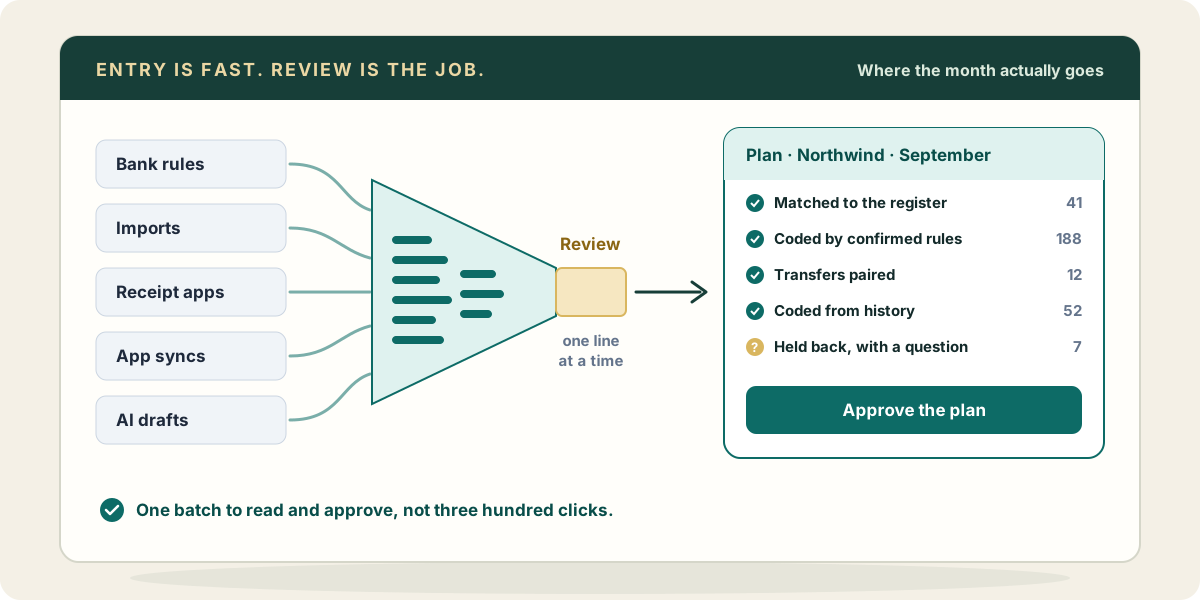
Ask a bookkeeper where the month goes and the first answer is usually “entry.” Coding the bank lines, keying the bills, building the journal entry for the payroll nobody integrated. Twenty years of QuickBooks tooling has been aimed at that answer, and most of it works. A competent bookkeeper today enters a month of transactions in a fraction of the time it took in 2010.
The month did not shrink by the same fraction. That gap is the subject of this post.
Every speed-up is a decision made once
Strip the branding off the tools that make entry fast and they all do the same thing: they let someone decide once and apply that decision many times. They differ in who decided, when, and how much they knew at the time.
Bank rules are the oldest and the most honest about it. You decide that anything from “COMCAST” goes to Utilities, and QuickBooks Online applies it to every line that matches. Set to suggest, a rule saves typing. Set to auto-add, it saves looking.
Recurring transactions decide the shape of an entry in advance: the rent bill, the monthly depreciation entry, the retainer invoice. QuickBooks Online can post them on schedule, remind you, or hold them as templates.
Imports decide the format. A spreadsheet of bills from a client’s purchasing system, a CSV of bank activity for an account with no feed, a batch of journal entries built in Excel. Map the columns once and a hundred rows go in together.
Receipt capture apps decide what a document says. Photograph the receipt, let the app read the vendor, date and total, and publish the result to QuickBooks Online as an expense or a bill.
App syncs decide that some other system is right. The point-of-sale, the payment processor, the e-commerce platform, the payroll provider: each posts its own summary into the books on its own schedule.
An AI preparing entries is the newest, and it is different in one respect. It decides fresh each time, with whatever context it was given: the vendor’s history, the client’s notes, the document in front of it. It can handle the line no rule covers.
All six are genuinely faster than typing. None of them is the problem.
Where each one tops out
Each method hits a ceiling, and the ceiling is always the edge of what was known when the decision was made.
A bank rule knows the description text. It does not know that this particular Amazon charge was the owner’s personal purchase, or that the Home Depot run this month was for the Willow Street job rather than general repairs. Rules cover the boring middle of a bank feed beautifully and the interesting edges not at all.
A recurring entry knows last month’s amount. It does not know the lease escalated in June.
An import knows its columns. It does not know that the vendor names in the spreadsheet are spelled differently from the vendors in QuickBooks, so either it creates new ones or it stops, and both are wrong.
A receipt app knows what it read. It reads totals well and dates mostly well; it does not know which card charge the receipt belongs to when there are two from the same merchant that week.
A sync knows its own system. It does not know what else already put that money in the books.
And an AI knows what it was shown. Give it two years of history and the client’s notes and it will code a strange line better than a rule can. Give it nothing and it will code it plausibly, which is worse than not at all.
The quiet failure
Here is what the six have in common, and it matters more than their speed: when they are wrong, nobody hears about it.
A bank rule set to auto-add with a slightly too broad condition will post the wrong account every month until somebody happens to look at the P&L line and wonder why software subscriptions doubled. That can be a long time, and every one of those entries is clean, reconciled and wrong.
A recurring transaction posts the old amount, and the difference lands in whatever account the bank line gets coded to when it arrives.
An import that created new vendors leaves you with “Acme Supply” and “Acme Supply Inc.” side by side, each with half the history.
A receipt app publishes an expense, and then the bank line for the same charge arrives and gets added from the feed as a second expense. Now the receipt is attached to one and the bank reconciles against the other.
A sync posts the processor’s deposit as sales, while the bookkeeper also records the same deposit from the bank line. Revenue is double for the month, and nothing in QuickBooks Online thinks anything is unusual, because both entries are valid on their own.
An AI with write access does all of the above at once, faster, with better grammar.
None of these is a dramatic failure. Each produces entries that look exactly like correct entries. They are only caught by somebody reviewing them, and that is the point.
Once entry is fast, review is the job
A month of bank activity for a small client might be three hundred lines. With good rules and good tooling, entering them takes minutes. Knowing they are right takes much longer, and that time has not moved.
Review is where the bookkeeper’s judgment actually goes: does this belong to the job or to overhead, is this a duplicate, is this personal, is this the same payment the sync already recorded, does this vendor look like one we already have. It is also the part the person signing the books is accountable for. Nobody gets to say the rule did it.
So the question to ask of any tool that promises faster entry is not how fast it enters. They are all fast now. The question is what it does to the time and the risk of review. Four things decide that.
Does it hold the work for review, or post and let you find it? A tool that posts first turns review into archaeology: you are searching the ledger for mistakes after they are part of it. A tool that prepares a batch and waits lets you review before anything is in the books, and lets you approve the whole batch at once when it is right, instead of clicking three hundred “Add” buttons.
Does it check against what is already there? Most double entries come from two honest tools that did not know about each other. Before a line is coded, it should be compared with the register: is there already an expense, a bill payment, a deposit for this amount around this date? A match found before posting costs nothing. A duplicate found after reconciliation costs an afternoon.
Were its rules confirmed by a person? A rule is a decision about the future. It should be one someone made on purpose, with a look at what it would have matched in the past, not one a tool inferred and switched on.
Does it leave a record of why? The journal shows what posted. A month later, the only question anyone has is why: why this account, why was that line left out, who decided the Amazon charge was personal. A tool that leaves no record of its reasoning makes every future review start from zero.
How we built Zeno around that
Zeno is our answer to those four questions for QuickBooks Online, and it is easiest to describe in terms of them.
Your AI (Claude, ChatGPT or Muse) works through Zeno and never reaches QuickBooks itself. Bank and card lines come into Zeno through a bank connection or an imported statement. Zeno cannot read QuickBooks Online’s For Review tab, because Intuit’s API does not expose it, so the account is handled in Zeno instead, with its QuickBooks feed turned off. Zeno matches incoming lines against what is already in the register, applies the rules a person confirmed, and finds transfers. Your AI codes what is left from the client’s own history and holds back what it is unsure of, with the question it would ask.
All of it becomes a plan. Nothing posts until a person approves that plan, with their own click, in the Zeno console or on the plan drawn in the conversation. The plan can be trimmed line by line before approval, and an approved run can be reversed. Rules the AI infers are drafts until someone confirms them, and a draft rule can be tested against past lines first. The AI logs what it did and why after every action, so the next person, or the next session, starts from the reasoning and not just the result.
None of that makes entry faster than a good bank rule. It is meant to make the part after entry faster, and safer, because that is where the month goes.
If you want the details, the bank feeds page shows how lines reach Zeno and how they get sorted, what to ask has the kind of instructions that work well, and the limits page is the plain list of what Zeno will not do, including the things in this post it deliberately leaves to you.