

A useful AI assistant should be able to follow a bookkeeping job through its connected steps. Preparing an invoice is one step. Knowing which estimate it came from, how a payment settles it, and where that payment was deposited makes the work useful.
The September 18–19 changes bring more of those connections into Zeno for QuickBooks Online, alongside broader corrections, supporting documents and a clearer record of what actually posted.
From estimate to invoice to payment
An invoice in a batch can now be raised from its estimate. A received payment can be allocated across invoices and credits, and a deposit can refer to payments received in the same batch. Bill payments use the appropriate bank or credit-card payment route for the account selected.
That gives an assistant a more complete assignment:
Prepare invoices from these estimates, apply the customer payments to the right invoices and credits, and prepare the deposit. Show me the connections before posting.
The assistant still needs the allocation evidence. Ambiguity belongs in review, not in an invented match. Restating a payment’s allocations also warns about credits that would be dropped and balances that would reopen.
Supported sales forms now carry bill-to and ship-to addresses, customer email, a customer message, an email-send setting and line tax codes. The exact fields depend on the form. Refund receipts, for example, refuse a ship-to address and a queued send because QuickBooks Online does not accept those fields there. Marking a form for later email is not a claim that the email has been delivered.
Correct a set of transactions by name
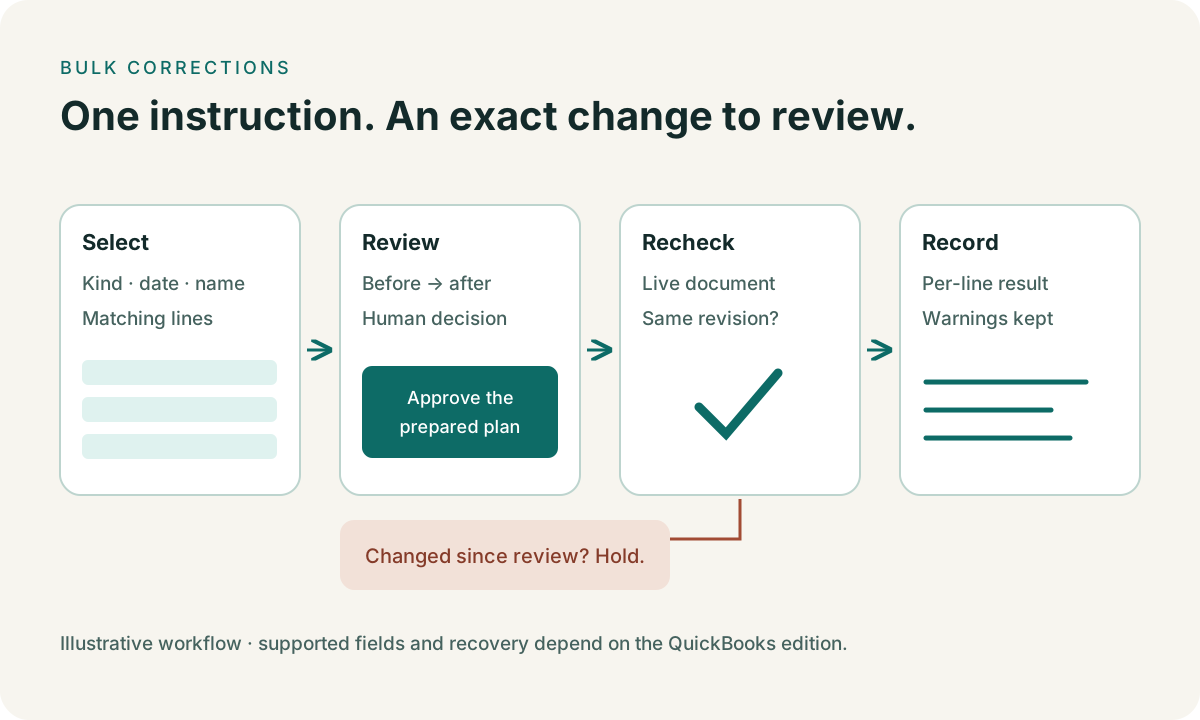
Cleanup can select transactions and prepare one header patch, a line recode, or both. Supported header references include customer, vendor, class and location. A recode can move matching line coding between accounts, classes, items or customers. It can also correct the bank or card account a purchase was paid from, subject to the type of transaction and account.
Find the checks coded to Automobile last quarter. Prepare a move of those lines to Vehicle Fuel, keep the other lines, and show me the proposed changes.
Zeno reads the existing documents, shows the proposed work, and pins the review to their revisions. A document changed after review is refused at apply. Moving an account is checked against what that account can actually do; a deposit cannot simply be moved onto a credit card.
Bring the lists and receipts along
Tax agencies and currencies can now be created through a names plan, subject to the company’s settings and the API’s limits. Existing records are checked again at apply. A currency is not renamed or recreated over its own code, and a tax agency cannot be retired as an ordinary reversal.
A folder of attachments can be recorded as one run, with each line identifying the attachment and its destination. This is a direct, journalled operation: attaching evidence does not change a transaction amount and does not use the transaction approval table. Reversing that run removes the attachments it created.
See what QuickBooks actually posted
The run now records the posted amount beside the proposed amount when they differ. Balanced journal entries use the debit total rather than a misleading zero net amount. If a create request resolves to an existing document, the run distinguishes that from a fresh posting and records the outcome.
Query results and run details can also be downloaded for spreadsheet work. Exports protect text that spreadsheet software could otherwise interpret as a formula. The run download includes reversal information, so the working paper can follow what happened after the original posting.
Recovery is more careful about shared names too: when reversing a run, Zeno keeps a name active if documents outside that run still use it and explains that decision. A supported ledger-only sales-receipt void uses the update route; a card-captured receipt is refused rather than treated as a payment refund.
Where the boundary remains
These changes do not give the QuickBooks Online API operations it does not have. Sales orders, statement charges, item receipts, assembly builds, inventory site transfers, mileage and US sales-tax payments remain outside this posting surface. Unsupported work is flagged before posting. Several of those jobs are available in the Desktop edition’s expanded batch workflow.
Bulk apps already do useful work. SaasAnt and Transaction Pro deserve credit for their import and cleanup workflows. The practical question is whether you want to operate those tools yourself or prepare the work through your existing AI conversation, with the company’s context and a retained plan. Our sourced bulk-tools comparison sets out those differences without treating undocumented features as missing features.
Explore Zeno for QuickBooks Online, then bring one real batch through review.