Connections translate Zeno’s provider-neutral plans into the native operations of each accounting system.

What the QuickBooks Online connection covers

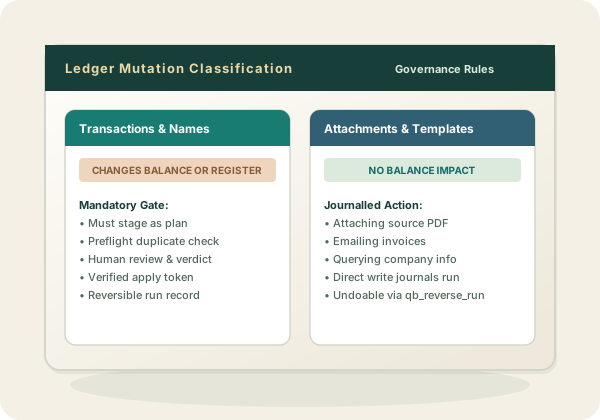
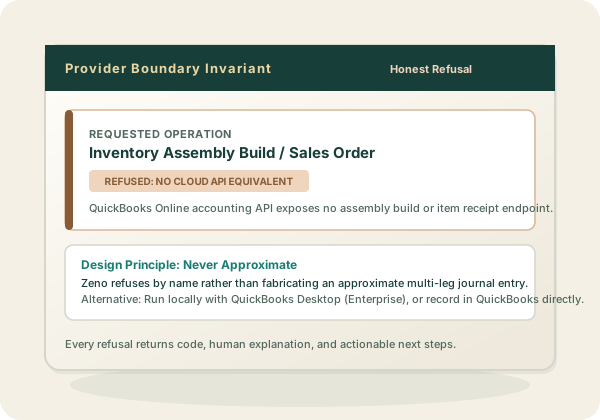
Reading: the chart of accounts, customers, vendors, items, employees, currencies, tax codes, budgets and transactions, plus QuickBooks’ own reports run live. Writing: the transaction kinds a bookkeeper works in — bills, checks, card charges and credits, deposits, transfers, journal entries, invoices, credit memos, sales receipts, refunds, payments received, bill payments, vendor credits, estimates, purchase orders and time — and the list names behind them: accounts, customers and jobs, vendors, items, classes, locations, terms, payment methods, employees, currencies and tax codes. A plan can propose names and postings together, which is what makes a migration reviewable: the chart of accounts, the customer list, and the history that references them arrive as one batch, and a reviewer can strike a proposed name as readily as a proposed entry. The full list is in the tool surface. Beyond posting, the hosted connection also carries QuickBooks-native work that has no plan around it because it changes no balance: emailing an invoice or estimate, fetching a rendered PDF, attaching a source document to a transaction, recurring templates, company preferences, and the entitlements that decide whether classes, locations, purchase orders, and budgets are available at all. Plan vs Direct Write Correcting what is already there is covered too — one document at a time, or as a reviewed bulk cleanup that journals each document’s prior state so the run reverses. Where QuickBooks Online has no equivalent — inventory adjustments, assemblies, sales orders, item receipts, price levels, reconciliation — the tool refuses and names the alternative instead of approximating one. Reconciliation is the one people ask about most: what the connection can and cannot do with bank lines is set out in the queue. Unsupported Operation Refusal
One workflow, two places it runs

Hosted connections can reach internet-facing ledger APIs from the firm workspace. QuickBooks Desktop exposes only a local Windows interface, so its connection runs on the workstation. In both cases, Zeno prepares a plan, puts the proposed work through review, applies approved changes through the ledger’s native interface, and records what happened.

The ledger stays authoritative

Zeno reads, resolves, validates, and writes through the connection. It does not import the client’s books into a second general ledger. Any cached read model names its source and when it was last synchronized.

Provider differences stay visible

Transaction kinds, taxes, tracking dimensions, voiding, and deletion do not mean exactly the same thing across providers. The shared plan contract carries the plan and its review; each connection owns its provider-specific mapping and reversal rules.