
If you build software that interacts with QuickBooks Online, you quickly learn that querying the API directly for every user interaction is unviable. Intuit enforces strict rate limits (concurrent and per-minute throttles per realm), and complex accounting queries over REST take hundreds of milliseconds.
To give an AI assistant or human reviewer fast access to a client’s books, you need a local read model. In our case, this is a firm-scoped Postgres database mirroring the client’s accounts, vendors, and transactions.
The standard tool Intuit provides for this is the Change Data Capture endpoint:
GET /v3/company/{realmId}/cdc?entities={entities}&changedSince={timestamp}The documentation presents this as a straightforward delta stream: pass your entities and a timestamp, and QuickBooks Online returns everything created, modified, or deleted since that instant.
In production, several undocumented constraints and edge cases shape how you have to architect your synchronization engine.
1. The 30-day lookback wall
QuickBooks Online only retains change tracking data for 30 days. If you provide
a changedSince timestamp older than 30 days, the endpoint either returns an
error or fails to report older modifications.
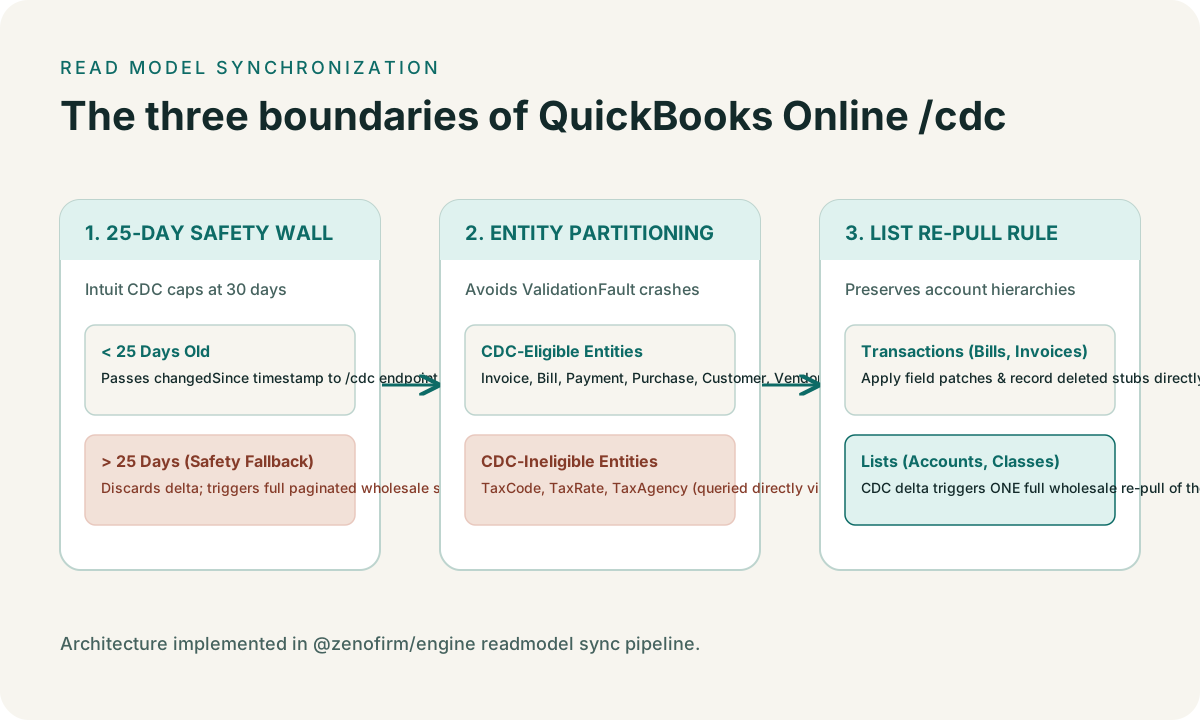
This means a pure CDC pipeline cannot recover from an extended outage or a dormant client file on its own. If a client connects their books, pauses their subscription, and returns six weeks later, resuming CDC will silently omit six weeks of bookkeeping changes.
In Zeno’s engine, we maintain a 25-day safety horizon:
// packages/engine/src/readmodel/sync.ts
const CDC_HORIZON_DAYS = 25;

if (daysSince(watermark) > CDC_HORIZON_DAYS) {
  // Drop the CDC path entirely; execute a clean full sync
  await executeFullSync(pool, realmId);
} else {
  await executeCdcSync(pool, realmId, watermark);
}
If the stored watermark is older than 25 days, the engine discards the CDC delta and executes a fresh, paginated wholesale sync across all entities.
2. The CDC_INELIGIBLE entity trap
You cannot pass all QuickBooks Online entity types to the /cdc endpoint.
Most transactional entities (Invoice, Bill, Payment, Purchase,
JournalEntry) and common list entities (Customer, Vendor, Account,
Item) support CDC. However, several critical accounting entities throw an
immediate ValidationFault (HTTP 400) if included in the query parameter:
TaxCodeTaxRateTaxAgencyCompanyCurrency
Intuit does not ignore unsupported entities in the request; it rejects the entire request with an unhelpful error message.
To handle this, our sync pipeline explicitly partitions entities into two distinct rosters:
// packages/engine/src/sync/cdc.ts
const CDC_INELIGIBLE = [
  "TaxCode",
  "TaxRate",
  "TaxAgency",
  "CompanyCurrency"
] as const;
CDC-eligible entities are queried together in batches over /cdc. Ineligible
entities bypass the change capture endpoint entirely and are refreshed using
targeted list queries whenever a sync cycle runs.
3. Deletions behave differently for lists vs. transactions
When an entity is modified, the CDC response contains the standard entity JSON
payload with an updated SyncToken and MetaData.LastUpdatedTime.
When an entity is deleted, QuickBooks Online treats lists and transactions differently:
- List entities (customers, vendors, accounts) cannot actually be deleted in
QuickBooks Online if they have ever been referenced. Instead, they are made
inactive (
Active: false). The CDC payload returns the full record withActive: false, which your read model can flag as retired. - Transactions (bills, checks, journal entries) can be genuinely deleted.
When a transaction is deleted, QuickBooks Online returns an empty stub with
status: "Deleted"and the recordId:
{
  "cdcResponse": [
    {
      "QueryResponse": [
        {
          "Bill": [
            {
              "Id": "142",
              "status": "Deleted"
            }
          ]
        }
      ]
    }
  ]
}
If your synchronization parser expects standard transaction fields (like
TotalAmt or Line), it will fail on deleted stubs. The ingestion handler must
explicitly branch on status === "Deleted" and remove the corresponding record
from your read model rather than attempting to deserialize line items.
4. The wholesale re-pull rule for lists
When CDC reports that a list entity has changed (for example, an account was renamed or reparented), applying a surgical update to that single row in your database is risky.
Accounts, classes, and departments in QuickBooks Online are hierarchical. If an
account’s parent reference changes, a single row update can create an orphaned
tree in your local read model. Furthermore, changes to account classifications or
sub-account hierarchies often affect adjacent rows without updating their
individual MetaData.LastUpdatedTime.
In our sync architecture, CDC serves as a notification signal for lists rather than an authoritative state update:
- CDC runs and detects that three
Accountrecords changed. - The engine notes that the
Accountlist is dirty. - Rather than applying three field patches, the engine executes one full,
paginated query for all active accounts:
SELECT * FROM Account WHERE Active IN (true, false) - The local account table is updated in one transaction, rebuilding the hierarchy cleanly.
For transactions (which are flat, voluminous, and immutable once settled), CDC payloads are applied directly. For lists (which are small and hierarchical), any CDC hit triggers a wholesale refresh.
Summary
Change Data Capture is an essential tool for keeping an accounting read model fresh without exhausting API quotas. But relying on it requires defensive boundaries:
- Never trust a CDC watermark older than 25–30 days.
- Filter out tax and currency entities that trigger
ValidationFaulterrors. - Handle deleted transaction stubs separately from inactive list items.
- Treat list deltas as invalidation triggers for a full list reload rather than applying partial patches.